
Shared Chat Layer
The @herdctl/chat package is the shared infrastructure layer that sits between @herdctl/core and the platform-specific chat connectors (@herdctl/discord, @herdctl/slack). It exists because the Discord and Slack integrations share approximately 70-80% of their code — session management, message splitting, streaming response, content extraction, error handling, and tool parsing are functionally identical across platforms. Rather than maintain two copies of this logic, @herdctl/chat provides a single implementation that both connectors compose into their platform-specific pipelines.
Architecture Overview
Section titled “Architecture Overview”
The chat system follows a shared abstraction pattern. Common logic lives in @herdctl/chat, platform connectors implement platform-specific behavior, and @herdctl/core orchestrates everything through a minimal IChatManager interface.
Package Dependency Graph
Section titled “Package Dependency Graph”Dependencies flow strictly in one direction. Platform packages depend on the shared chat package, which depends on core. Core never depends on any chat package — it discovers managers at runtime via dynamic imports.

| Package | Depends On | Platform SDK |
|---|---|---|
@herdctl/discord | @herdctl/chat, @herdctl/core | discord.js |
@herdctl/slack | @herdctl/chat, @herdctl/core | @slack/bolt |
@herdctl/chat | @herdctl/core | None |
@herdctl/core | — | None |
The shared chat package never imports discord.js or @slack/bolt. Its only runtime dependencies beyond core are yaml (for session state persistence) and zod (for schema validation).
What Lives in the Shared Layer
Section titled “What Lives in the Shared Layer”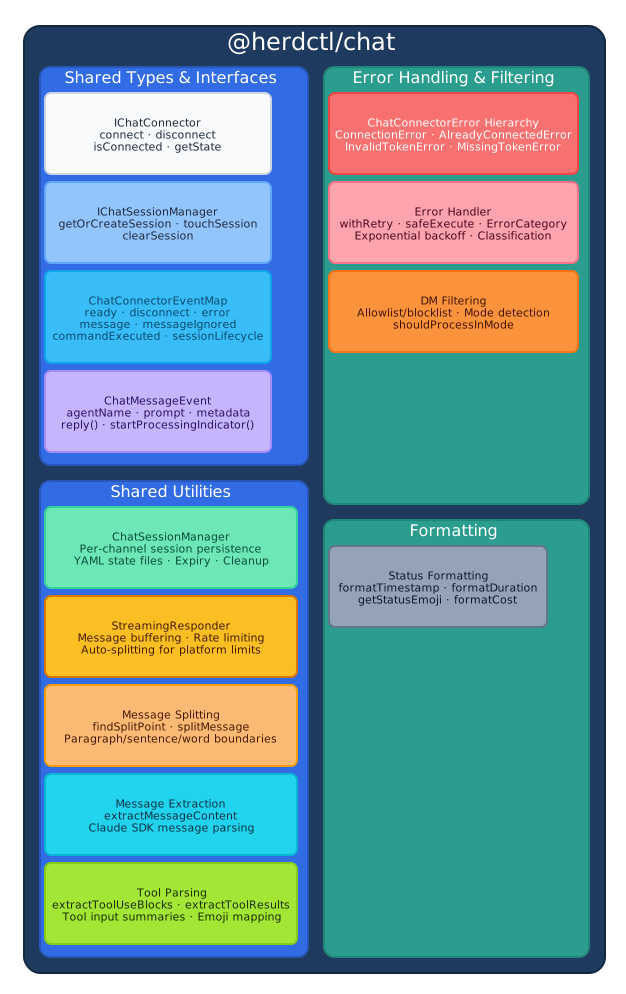
The @herdctl/chat package provides the following components, each extracted from code that was previously duplicated between the Discord and Slack packages.
| Component | File | Purpose |
|---|---|---|
| Shared types | types.ts | IChatConnector, IChatSessionManager, ChatConnectorState, ChatConnectionStatus, ChatMessageEvent, ChatConnectorEventMap, ChatConnectorLogger |
| Session manager | session-manager/ | ChatSessionManager class, session types, Zod schemas, session error hierarchy |
| Streaming responder | streaming-responder.ts | StreamingResponder class for buffered, rate-limited message delivery |
| Message splitting | message-splitting.ts | splitMessage(), findSplitPoint(), needsSplit(), truncateMessage() |
| Message extraction | message-extraction.ts | extractMessageContent() for parsing Claude SDK assistant messages |
| Tool parsing | tool-parsing.ts | extractToolUseBlocks(), extractToolResults(), getToolInputSummary() |
| DM filtering | dm-filter.ts | checkDMUserFilter(), isDMEnabled(), getDMMode(), shouldProcessInMode() |
| Error classes | errors.ts | ChatConnectorError hierarchy with typed error codes and type guards |
| Error handler | error-handler.ts | ErrorCategory, ClassifiedError, withRetry(), safeExecute(), safeExecuteWithReply() |
| Status formatting | status-formatting.ts | formatTimestamp(), formatDuration(), getStatusEmoji(), formatNumber() |
Shared Types and Interfaces
Section titled “Shared Types and Interfaces”The type definitions in @herdctl/chat establish the contracts that all platform connectors satisfy. These were extracted from the near-identical type definitions that existed independently in both @herdctl/discord and @herdctl/slack.
IChatConnector
Section titled “IChatConnector”The base interface for all chat platform connectors:
interface IChatConnector { readonly agentName: string; readonly sessionManager: IChatSessionManager; connect(): Promise<void>; disconnect(): Promise<void>; isConnected(): boolean; getState(): ChatConnectorState;}Both DiscordConnector and SlackConnector implement this interface. Discord’s state extends the base ChatConnectorState with additional fields like rateLimits and botUser.discriminator; Slack’s state is a subset of the base.
IChatSessionManager
Section titled “IChatSessionManager”The session manager interface that both platforms use for per-channel conversation tracking:
interface IChatSessionManager { readonly agentName: string; getOrCreateSession(channelId: string): Promise<{ sessionId: string; isNew: boolean }>; getSession(channelId: string): Promise<{ sessionId: string; lastMessageAt: string } | null>; setSession(channelId: string, sessionId: string): Promise<void>; touchSession(channelId: string): Promise<void>; clearSession(channelId: string): Promise<boolean>; cleanupExpiredSessions(): Promise<number>; getActiveSessionCount(): Promise<number>;}ChatConnectorEventMap
Section titled “ChatConnectorEventMap”All connectors emit the same set of events. Platform-specific connectors may add additional events, but the shared set covers the common lifecycle:
interface ChatConnectorEventMap { ready: { agentName: string; botUser: { id: string; username: string } }; disconnect: { agentName: string; reason: string }; error: { agentName: string; error: Error }; message: ChatMessageEvent; messageIgnored: { agentName: string; reason: string; channelId: string }; commandExecuted: { agentName: string; commandName: string; userId: string; channelId: string }; sessionLifecycle: { agentName: string; event: SessionLifecycleEvent; channelId: string; sessionId: string };}ChatMessageEvent
Section titled “ChatMessageEvent”The common message event shape emitted when a processable message arrives. Platform connectors build this from their native message types:
interface ChatMessageEvent { agentName: string; prompt: string; metadata: { channelId: string; userId: string; wasMentioned: boolean; [key: string]: unknown; // Platform-specific fields }; reply: (content: string) => Promise<void>; startProcessingIndicator: () => () => void;}Discord extends the metadata with guildId, messageId, username, and conversation history. Slack extends it with messageTs. The reply function wraps the platform-specific send mechanism, and startProcessingIndicator wraps typing indicators (Discord) or emoji reactions (Slack).
Message Flow Pipeline
Section titled “Message Flow Pipeline”When a user sends a message in Discord or Slack, it flows through the same pipeline with platform-specific entry and exit points but shared processing in between.

Step-by-Step
Section titled “Step-by-Step”-
Message received — The platform connector receives a raw event from the chat platform’s WebSocket connection (Discord gateway or Slack Socket Mode).
-
Mention detection — Platform-specific logic determines if the bot was mentioned. Discord uses the
message.mentionsAPI; Slack checks for<@USERID>text patterns. -
Prompt extraction — The bot mention is stripped from the message text, producing a clean prompt string.
-
Processing indicator — The platform starts showing activity. Discord sends a typing indicator on an interval; Slack adds an hourglass emoji reaction. Both return a stop function.
-
Session lookup — The shared
ChatSessionManagerlooks up or creates a session for this channel. Sessions are stored as YAML files in.herdctl/<platform>-sessions/and expire after a configurable number of hours (default: 24). -
Agent execution — The manager calls
FleetManager.trigger()with the prompt and session context. The Runner executes the Claude agent and streams SDK messages back. -
Content extraction — The shared
extractMessageContent()function parses assistant messages from the Claude SDK, handling both direct string content and arrays of content blocks. -
Streaming response — The shared
StreamingResponderbuffers content, respects rate limits between sends, and automatically splits messages that exceed platform character limits (2,000 for Discord, 4,000 for Slack). -
Platform formatting — The reply is formatted for the target platform. Discord uses embeds and standard markdown; Slack converts to mrkdwn and posts in threads.
-
Delivery — The formatted message is sent back to the user in the same channel or thread.
Session Management
Section titled “Session Management”The ChatSessionManager is the strongest shared abstraction in the package. Before extraction, the Discord and Slack session manager implementations were 95%+ identical — same YAML persistence, same atomic writes, same expiry logic, same Zod schema validation. The only differences were the storage path and session ID prefix.
How It Works
Section titled “How It Works”ChatSessionManager is parameterized by a platform string (e.g., "discord", "slack") that determines the storage path and session ID format:
| Aspect | Discord | Slack |
|---|---|---|
| Storage path | .herdctl/discord-sessions/<agent>.yaml | .herdctl/slack-sessions/<agent>.yaml |
| Session ID format | discord-<agent>-<uuid> | slack-<agent>-<uuid> |
| Expiry default | 24 hours | 24 hours |
const sessionManager = new ChatSessionManager({ platform: "discord", // or "slack" agentName: "my-agent", stateDir: ".herdctl", sessionExpiryHours: 24,});Persistence
Section titled “Persistence”Session state is persisted as YAML with atomic writes: content is written to a temporary file and then renamed into place. This prevents corruption if the process crashes mid-write. The rename operation includes retry logic with exponential backoff for Windows compatibility, where concurrent file access can cause transient EACCES or EPERM errors.
State files are validated against a Zod schema on load. Corrupted or unparseable files are treated as empty state rather than causing a crash — the session manager logs a warning and creates fresh state.
Session Lifecycle
Section titled “Session Lifecycle”Each channel in a chat platform maps to one session at a time:
- Creation — When a user sends a message in a channel with no active session,
getOrCreateSession()generates a new session ID and persists it. - Resume — Subsequent messages in the same channel return the existing session ID, allowing the Claude agent to continue the conversation with full context.
- Touch — After each message,
touchSession()updates thelastMessageAttimestamp to keep the session active. - Expiry — Sessions that have been inactive for longer than the configured timeout (default: 24 hours) are treated as expired. Expired sessions are not returned by
getSession(). - Cleanup —
cleanupExpiredSessions()is called at connector startup and removes all expired sessions from the state file. - Clear — Users can manually clear their session via commands (
/resetin Discord,!resetin Slack), which callsclearSession()to start fresh.
For more on how sessions work from a user perspective, see Sessions.
Streaming Response
Section titled “Streaming Response”The StreamingResponder class handles incremental message delivery to chat platforms. Rather than collecting all agent output and sending it at the end, it streams content as it arrives from the Claude SDK.
const streamer = new StreamingResponder({ reply: (content) => channel.send(content), logger, agentName: "my-agent", maxMessageLength: 2000, // Discord maxBufferSize: 1500, // Leave room for formatting minMessageInterval: 1000, // Rate limit: 1 message per second platformName: "Discord",});The responder:
- Buffers incoming content — Text is accumulated until a complete message is available.
- Respects rate limits — Enforces a minimum interval between sends (default: 1 second) to avoid platform rate limiting.
- Splits long messages — Content exceeding the platform character limit is split at natural boundaries (paragraph breaks, sentence ends, word boundaries) using
splitMessage(). - Tracks delivery —
hasSentAnything()reports whether any messages have been delivered, enabling fallback messages when the agent produces no output.
The maxMessageLength and maxBufferSize parameters are the primary platform-specific configuration. Discord uses 2,000/1,500; Slack uses 4,000/3,500.
Message Splitting
Section titled “Message Splitting”The message splitting algorithm is parameterized by maxLength and finds natural split points in the text. When a message exceeds the platform limit, splitMessage() searches for the best break point in order of preference:
- Paragraph breaks (
\n\n) - Line breaks (
\n) - Sentence endings (
.,!,?) - Clause boundaries (
,) - Word boundaries (
- Hard split at
maxLengthas a last resort
The algorithm avoids creating fragments smaller than 100 characters, which prevents an awkward trailing line with just a few words.
Content Extraction
Section titled “Content Extraction”extractMessageContent() parses text content from Claude SDK assistant messages. The SDK returns content in several formats depending on the message type and API version:
- Direct string —
message.contentas a plain string. - Nested string —
message.message.contentas a plain string. - Content block array —
message.message.contentas an array of{ type: "text", text: "..." }blocks.
The function handles all three formats and joins multiple text blocks into a single string. This logic was previously duplicated identically in both the Discord and Slack managers within core.
Tool Parsing
Section titled “Tool Parsing”The tool parsing utilities extract structured information from tool use and tool result messages in the Claude SDK stream:
extractToolUseBlocks()— Parsestool_usecontent blocks from assistant messages, returning the tool name, ID, and input for each invocation.extractToolResults()— Parses tool result content from user messages, handling both top-leveltool_use_resultfields and nested content block arrays.extractToolResultContent()— Extracts text from a single tool result value, supporting plain strings, objects withcontentstrings, and objects with content block arrays.getToolInputSummary()— Produces human-readable summaries of tool inputs (e.g., the command for Bash, the file path for Read/Write, the pattern for Grep).
These utilities support features like tool embed display in Discord and structured tool output in the web dashboard.
Error Handling
Section titled “Error Handling”Connector Errors
Section titled “Connector Errors”The ChatConnectorError hierarchy provides typed errors for common connection failures. Each error includes a code string for programmatic handling and an agentName for context:
| Error Class | Code | When Thrown |
|---|---|---|
ChatConnectionError | CHAT_CONNECTION_FAILED | Connection to the chat platform fails |
AlreadyConnectedError | CHAT_ALREADY_CONNECTED | Attempting to connect while already connected |
InvalidTokenError | CHAT_INVALID_TOKEN | Bot token is rejected by the platform |
MissingTokenError | CHAT_MISSING_TOKEN | Required token environment variable is not set |
Platform-specific connectors add their own error codes for platform-specific failures. Discord adds GATEWAY_ERROR and RATE_LIMITED; Slack adds SOCKET_MODE_ERROR and MESSAGE_SEND_FAILED.
Session Errors
Section titled “Session Errors”Session persistence failures have their own error hierarchy:
| Error Class | Code | When Thrown |
|---|---|---|
SessionStateReadError | SESSION_STATE_READ_FAILED | YAML state file cannot be read |
SessionStateWriteError | SESSION_STATE_WRITE_FAILED | Atomic write to state file fails |
SessionDirectoryCreateError | SESSION_DIRECTORY_CREATE_FAILED | Sessions directory cannot be created |
Error Classification and Retry
Section titled “Error Classification and Retry”The error handler provides classification utilities that platform connectors use to determine how to respond to failures:
ErrorCategory— Categorizes errors asTRANSIENT,PERMANENT,RATE_LIMIT,AUTH,NETWORK,API,CONFIGURATION,INTERNAL, orUNKNOWN.isTransientError()— Detects network and timeout errors that may succeed on retry (checks for patterns likeECONNRESET,ETIMEDOUT,socket hang up).isRateLimitError()— Detects rate limiting responses.isAuthError()— Detects authentication failures (invalid_auth,token_revoked,unauthorized).withRetry()— Executes an async operation with exponential backoff, configurable attempt limits, and a retry predicate.safeExecute()— Wraps an async operation, logging errors and returningundefinedon failure.safeExecuteWithReply()— Wraps an async operation, sending a user-friendly error message on failure.
The USER_ERROR_MESSAGES constant provides safe-to-display error messages for end users in chat channels, covering common failure modes like connection errors, rate limits, timeouts, and permission issues.
DM Filtering
Section titled “DM Filtering”The DM filtering utilities provide platform-agnostic allowlist/blocklist logic for direct messages:
isDMEnabled()— Checks whether DMs are enabled in the agent’s configuration. Defaults to enabled if no DM config is provided.getDMMode()— Returns the DM processing mode ("mention"or"auto"). DMs default to"auto"(no mention required).checkDMUserFilter()— Evaluates a user against the allowlist and blocklist. The blocklist takes precedence: a user on both lists is blocked.shouldProcessInMode()— Determines whether a message should be processed given the channel mode and whether the bot was mentioned. Bot messages are always ignored.
Discord currently uses all of these for its DM system. Slack does not yet support DMs but will use the same filtering logic when DM support is added.
What Stays in Platform Packages
Section titled “What Stays in Platform Packages”The platform packages retain everything that requires their platform SDK or is unique to their interaction model:
Discord (@herdctl/discord)
Section titled “Discord (@herdctl/discord)”- discord.js client management — Gateway intents, partials, shard events
- Slash commands — Registration via Discord REST API (
/help,/reset,/status) - Mention detection —
message.mentionsAPI, role mention handling - Conversation context — Channel history fetching,
ConversationContextbuilding - Rich presence — Bot activity and status display
- Embed formatting — Tool embeds, error embeds, result summaries
- Guild/channel hierarchy — Guild-based channel resolution, DM channel config
- Typing indicators —
sendTyping()on a refresh interval - Rate limit tracking — Discord REST rate limit event monitoring
Slack (@herdctl/slack)
Section titled “Slack (@herdctl/slack)”- Bolt App management — Socket Mode connection,
@slack/boltintegration - Prefix commands —
!commanddetection and routing - Mention detection —
<@USERID>text pattern matching - mrkdwn conversion —
markdownToMrkdwn(),escapeMrkdwn()for Slack formatting - Hourglass reactions — Processing indicator via
reactions.add()/reactions.remove() - File uploads —
files.uploadV2()API integration - File sender MCP — Injected MCP server for agent file sending
- Thread handling —
thread_tsawareness in message routing
Design Decisions
Section titled “Design Decisions”Composition Over Inheritance
Section titled “Composition Over Inheritance”The platform managers use composition rather than a base class. Each manager imports and assembles shared utilities (StreamingResponder, extractMessageContent, message splitting, etc.) explicitly. This was chosen because the Discord and Slack pipelines differ enough that a base class would need many template method hooks. Discord has tool embed support, rich presence, and code block analysis; Slack has file sender MCP integration, mrkdwn conversion, and thread-based reply routing. Explicit composition makes the code easier to follow than a base class with hooks scattered across overrides.
Platform Connectors Own Platform Code
Section titled “Platform Connectors Own Platform Code”All platform SDK interactions stay in the platform packages. The shared chat package never imports discord.js or @slack/bolt. This ensures:
- Adding a new platform connector does not affect existing ones.
- Platform SDK version upgrades are isolated to one package.
- The shared package has minimal dependencies (
@herdctl/core,yaml,zod).
Session Manager is Parameterized, Not Subclassed
Section titled “Session Manager is Parameterized, Not Subclassed”Rather than having DiscordSessionManager extends ChatSessionManager and SlackSessionManager extends ChatSessionManager, both platforms use ChatSessionManager directly with a platform parameter. The only differences between platforms — storage path and session ID prefix — are handled by string interpolation on the platform name. This avoids unnecessary class proliferation for what amounts to a single string parameter.
Dynamic Loading from Core
Section titled “Dynamic Loading from Core”FleetManager does not have a hard dependency on any chat package. It discovers which platforms are configured by inspecting agent configs, then dynamically imports the matching package:
if (hasDiscordAgents) { const mod = await import("@herdctl/discord"); const manager = new mod.DiscordManager(this); await manager.initialize();}This means @herdctl/discord and @herdctl/slack are optional peer dependencies. If a user only needs Slack support, they do not need discord.js installed, and vice versa.
Related Pages
Section titled “Related Pages”- System Architecture Overview — Package dependency graph and FleetManager orchestration
- Discord Connector — Per-agent bot model, slash commands, discord.js integration
- Slack Connector — Single-app model, Socket Mode, Bolt integration
- Agent Execution Engine — How the Runner executes agents and streams output
- Sessions — How conversation context works from a user perspective
- Discord Setup — Discord bot configuration and usage guide
- Slack Setup — Slack app configuration and usage guide