
Agents
An Agent is a configured Claude Code instance with its own identity, working directory, permissions, and schedules. Think of it as a specialized team member that operates autonomously on your codebase.
What is an Agent?
Section titled “What is an Agent?”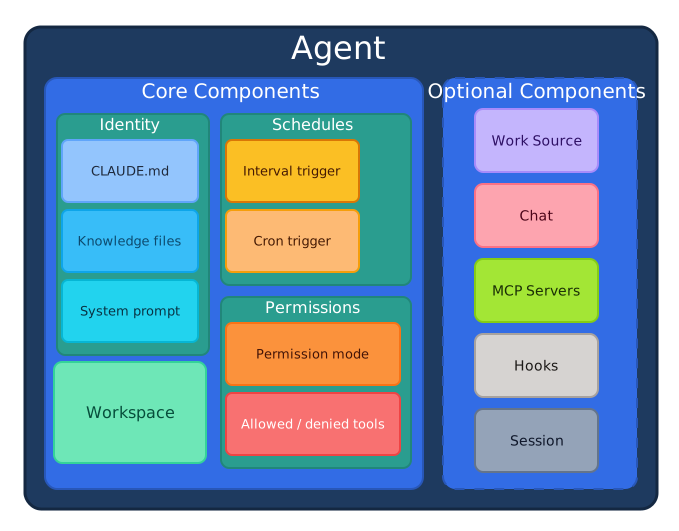
Each agent operates independently with:
- Identity: A name, role, and personality, plus whatever
CLAUDE.mdlives in its working directory - Working directory: The directory the agent operates in
- Permissions: A permission mode and exactly which tools the agent can use
- Schedules: When and how to invoke (multiple allowed per agent)
Standalone vs. Project-Embedded Agents
Section titled “Standalone vs. Project-Embedded Agents”Every herdctl agent has a working directory. This creates two natural categories depending on how that directory is used.
Standalone agents have their own dedicated directory for storing data. A price checker keeps price history in its folder. A hurricane tracker stores weather data. These agents do not need an existing codebase — they create their own working environment from scratch and use their directory primarily for data persistence.
Project-embedded agents run inside an existing Claude Code project — one that already has a CLAUDE.md, local skills, sub-agents, and project-specific configuration. When you point a herdctl agent at an existing project directory, it operates exactly as if you ran claude in that directory. Your instructions are honored, your slash commands work, and your MCP servers are available. This means you can add autonomous capabilities (scheduled jobs, chat interfaces, webhook triggers) to any existing Claude Code project without changing how that project is set up.
Key Properties
Section titled “Key Properties”| Property | Required | Description |
|---|---|---|
name | Yes | Unique identifier for the agent within your fleet (letters, numbers, -, _) |
description | No | Human-readable explanation of the agent’s purpose |
working_directory | No | Directory the agent runs in — a path string, or an object with a root |
identity | No | Optional name, role, and personality strings |
system_prompt | No | Extra system prompt text for the agent |
default_prompt | No | Prompt used when triggering without an explicit prompt |
schedules | No | Named map of triggers defining when the agent runs |
work_source | No | Where the agent gets tasks from (e.g., GitHub Issues) |
permission_mode | No | Claude Code permission mode (e.g., default, acceptEdits, bypassPermissions, plan) |
tools / allowed_tools / denied_tools | No | Tool access control lists |
session | No | Session settings: max_turns, timeout, model |
chat | No | Discord/Slack chat integration |
model / max_turns | No | Model override and turn limit for jobs |
Agent configs are validated strictly — unknown keys are rejected at load time. Only name is required. The workspace key is a deprecated alias for working_directory and logs a warning. See Agent Configuration for the full schema.
Example Agent Configuration
Section titled “Example Agent Configuration”Here’s a complete example of an agent that implements features and fixes bugs:
name: bragdoc-coderdescription: "Implements features and fixes bugs in Bragdoc"
# Directory the agent runs in (clone the repo here yourself)working_directory: ./bragdoc-ai
# Agent identityidentity:  name: Bragdoc Coder  role: Software engineer  personality: Pragmatic, test-driven, writes small focused PRs
# Work source: pull ready issues from GitHubwork_source:  type: github  repo: edspencer/bragdoc-ai  labels:    ready: ready    in_progress: agent-working  exclude_labels:    - blocked    - needs-design  cleanup_on_failure: true  auth:    token_env: GITHUB_TOKEN
# Schedules: a named map, each entry pairs a trigger with a promptschedules:  issue-check:    type: interval    interval: 5m    prompt: |      Check for ready issues in the repository.      Pick the oldest one and implement it.
# Session limitssession:  max_turns: 50  timeout: 30m
# Permissionspermission_mode: acceptEditsdenied_tools:  - WebSearch
Agent Identity
Section titled “Agent Identity”Every agent has a unique identity defined by:
A unique identifier for the agent within your fleet. Use descriptive names that indicate the agent’s purpose:
bragdoc-coder- Implements featuresbragdoc-marketer- Handles marketing tasksproject-support- Answers user questions
Description
Section titled “Description”A human-readable description of what the agent does. This appears in the dashboard and helps team members understand each agent’s role.
Identity Block
Section titled “Identity Block”The optional identity block gives the agent a persona:
identity: name: Support Bot role: Customer support specialist personality: Friendly, concise, always links to relevant docsInstructions (CLAUDE.md and system prompts)
Section titled “Instructions (CLAUDE.md and system prompts)”Behavioral instructions come from two places:
- The working directory’s
CLAUDE.md— by default herdctl loads project settings (CLAUDE.md, skills, commands) from the working directory, just like runningclaudethere. Thesetting_sourcesoption controls this discovery. system_prompt— extra instructions supplied directly in the agent config.
system_prompt: | You are the marketing specialist for this project. Always write in the brand voice described in docs/voice.md.setting_sources: [project]Multiple Agents, Same Working Directory
Section titled “Multiple Agents, Same Working Directory”Multiple agents can share the same working directory. For example:
bragdoc-coder- Implements features in bragdoc-aibragdoc-marketer- Handles marketing in bragdoc-aibragdoc-support- Answers questions about bragdoc-ai
Each has different schedules, prompts, and potentially different identities, but they all work on the same codebase.
Agent Lifecycle
Section titled “Agent Lifecycle”- Created: Agent configuration loaded from YAML
- Initialized: Working directory resolved and validated
- Idle: Waiting for next trigger
- Running: Executing a scheduled task (creates a Job)
- Completed: Task finished, returns to idle
- Stopped: Agent manually stopped
Common Patterns
Section titled “Common Patterns”The Coder Agent
Section titled “The Coder Agent”Implements features and fixes bugs from issue trackers:
name: project-coderdescription: "Implements features from GitHub Issues"working_directory: ./my-project
work_source:  type: github  repo: owner/my-project  labels:    ready: ready    in_progress: agent-working
schedules:  issue-check:    type: interval    interval: 5m    prompt: "Check for ready issues and implement the oldest one."
The Marketing Agent
Section titled “The Marketing Agent”Monitors channels and generates reports:
name: project-marketerdescription: "Monitors social media and generates analytics"working_directory: ./my-project
schedules:  hourly-scan:    type: cron    cron: "0 * * * *"    prompt: "Scan social media for product mentions."
  daily-report:    type: cron    cron: "0 9 * * *"    prompt: "Generate daily analytics report."
The Support Agent
Section titled “The Support Agent”Responds to chat messages. Chat-enabled agents appear as distinct “colleagues” in your messaging platform.
Discord — each agent has its own Discord bot:
name: project-supportdescription: "Answers user questions in Discord"working_directory: ./my-project
chat:  discord:    bot_token_env: SUPPORT_DISCORD_TOKEN  # This agent's own bot    guilds:      - id: "guild-id-here"        channels:          - id: "123456789"            mode: mention  # Responds when @mentioned        dm:          enabled: true          mode: auto
Slack — agents share one bot, with different channels routing to different agents:
name: project-supportdescription: "Answers user questions in Slack"working_directory: ./my-project
chat:  slack:    bot_token_env: SLACK_BOT_TOKEN    app_token_env: SLACK_APP_TOKEN    channels:      - id: "C0123456789"        mode: mention  # Responds when @mentioned
Chat conversations get their own sessions per channel automatically — see Sessions.
Related Concepts
Section titled “Related Concepts”- Schedules - Define when agents run
- Triggers - What starts agent execution
- Workspaces - Where agents operate
- Jobs - Individual agent executions
- Sessions - Agent context management
Configuration Reference
Section titled “Configuration Reference”For the complete schema and all available options, see:
- Agent Configuration - Full YAML reference
- Permissions - Tool and file access control
- Fleet Configuration - Fleet-wide defaults