
Configuration System
The configuration system is the first thing that runs when herdctl starts. It discovers the herdctl.yaml fleet configuration file, parses YAML, validates against Zod schemas, interpolates environment variables, loads all referenced agent files, merges defaults, and (for composed fleets) recursively loads sub-fleet configurations. The result is a single ResolvedConfig object that every other subsystem consumes.
All configuration logic lives in packages/core/src/config/. The module is structured as follows:
| File | Responsibility |
|---|---|
schema.ts | Zod schemas for fleet config, agent config, fleet references, schedules, permissions, Docker, chat, hooks |
loader.ts | Config discovery, recursive fleet loading, agent loading, qualified name computation |
merge.ts | Deep merge utilities, fleet defaults into agent configs |
interpolate.ts | Environment variable interpolation (${VAR} and ${VAR:-default}) |
parser.ts | Lower-level YAML parsing functions, error classes |
index.ts | Public exports |
Config Discovery
Section titled “Config Discovery”When loadConfig() is called without an explicit path, it searches for a configuration file by walking up the directory tree from the current working directory — the same pattern git uses to find .git/. The search checks for both herdctl.yaml and herdctl.yml at each level.
// Auto-discover from current working directoryconst config = await loadConfig();
// Load from a specific fileconst config = await loadConfig("./my-project/herdctl.yaml");
// Load from a specific directory (searches within it)const config = await loadConfig("./my-project");
The discovery algorithm:
- Start from the given directory (or
process.cwd()if none provided). - At each directory, check for
herdctl.yamlthenherdctl.yml. - If found, return the absolute path.
- Move to the parent directory. If the parent equals the current directory (filesystem root reached), throw
ConfigNotFoundError.
If a path ending in .yaml or .yml is provided, it is treated as a direct file path with no directory walking.
Loading Pipeline
Section titled “Loading Pipeline”The full loading pipeline runs through these stages in order:
- Discovery — Find the config file on disk (or use the provided path).
- Dotenv loading — Load a
.envfile from the config file’s directory if one exists. System environment variables take precedence over.envvalues. - YAML parsing — Parse the fleet config file with the
yamlpackage. - Backward compatibility — Migrate deprecated field names (e.g.,
workspacetoworking_directory). - Zod validation — Validate the parsed object against
FleetConfigSchema. - Environment interpolation — Replace
${VAR}patterns in all string values throughout the config tree. - Path normalization — Resolve relative paths in
working_directoryanddefaults.working_directoryrelative to the config file’s directory. - Agent loading — For each entry in the
agentsarray, read the agent YAML file, parse, validate, interpolate, merge fleet defaults, and resolve paths. - Sub-fleet loading — For each entry in the
fleetsarray, recursively load the sub-fleet config, resolve its agents, and flatten everything into a single agent list. See Fleet Composition below. - Return — Return a
ResolvedConfigcontaining the fleet config, the flat list ofResolvedAgentobjects, and metadata.
export interface ResolvedConfig { fleet: FleetConfig; // The parsed and validated fleet configuration agents: ResolvedAgent[]; // All agents, fully resolved with defaults merged configPath: string; // Absolute path to the fleet configuration file configDir: string; // Directory containing the fleet configuration}Schema Overview
Section titled “Schema Overview”All schemas are defined with Zod and provide both runtime validation and TypeScript type inference. Every exported type is derived from its schema using z.infer<>.
FleetConfigSchema
Section titled “FleetConfigSchema”The top-level schema for herdctl.yaml:
version: 1
fleet:  name: my-fleet  description: "Optional description"
defaults:  model: claude-sonnet-4-20250514  permission_mode: acceptEdits  allowed_tools: [Read, Edit, Write, Bash, Glob, Grep]  work_source:    type: github    repo: owner/repo  docker:    enabled: false  session:    max_turns: 50
working_directory:  root: ~/herdctl-workspace  auto_clone: true
fleets:  - path: ./project-a/herdctl.yaml  - path: ./project-b/herdctl.yaml    name: project-b-override
agents:  - path: ./agents/security-auditor.yaml  - path: ./agents/engineer.yaml    overrides:      model: claude-sonnet-4-20250514
web:  enabled: true  port: 3232
webhooks:  enabled: false  port: 8081
Key schema fields:
| Field | Type | Description |
|---|---|---|
version | number | Schema version (default: 1) |
fleet | object | Fleet metadata: name and description |
defaults | DefaultsSchema | Default values merged into every agent |
working_directory | WorkingDirectorySchema | Workspace root, auto-clone settings |
fleets | FleetReferenceSchema[] | Sub-fleet references for fleet composition |
agents | AgentReferenceSchema[] | Agent file references |
web | WebSchema | Web dashboard settings |
webhooks | WebhooksSchema | Webhook receiver settings |
docker | FleetDockerSchema | Fleet-level Docker defaults |
chat | ChatSchema | Fleet-level chat settings |
The schema uses Zod’s .strict() mode, which rejects unknown fields. This catches typos and invalid field names at startup rather than silently ignoring them.
AgentConfigSchema
Section titled “AgentConfigSchema”Each agent is defined in its own YAML file:
name: security-auditordescription: "Runs security audits on pull requests"
working_directory: ~/herdctl-workspace/my-projectrepo: owner/my-project
model: claude-sonnet-4-20250514max_turns: 100permission_mode: acceptEditsruntime: sdk
identity:  name: Security Auditor  role: security reviewer
system_prompt: |  You are a security auditor. Review code for vulnerabilities.
allowed_tools:  - Read  - Glob  - Grep  - Bash
work_source:  type: github  repo: owner/my-project  labels:    ready: needs-security-review
schedules:  audit:    type: interval    interval: "30m"    prompt: "Check for issues needing security review."
session:  max_turns: 50  timeout: "30m"
mcp_servers:  github:    command: npx    args: ["-y", "@modelcontextprotocol/server-github"]    env:      GITHUB_TOKEN: ${GITHUB_TOKEN}
chat:  discord:    bot_token_env: AUDITOR_DISCORD_TOKEN    guilds:      - id: "123456789"        channels:          - id: "987654321"            mode: mention
hooks:  after_run:    - type: discord      channel_id: "111222333"      bot_token_env: NOTIFY_DISCORD_TOKEN
docker:  enabled: true  memory: 2g
Agent names must match the pattern ^[a-zA-Z0-9][a-zA-Z0-9_-]*$ — alphanumeric start, then letters, numbers, underscores, and hyphens. Dots are explicitly forbidden because they serve as the hierarchy separator in qualified names (see Qualified Names).
Agent References
Section titled “Agent References”Each entry in the fleet’s agents array is an AgentReferenceSchema with a required path and optional overrides:
agents: - path: ./agents/engineer.yaml - path: ./agents/auditor.yaml overrides: model: claude-sonnet-4-20250514 max_turns: 200The overrides field accepts any partial agent config fields and is deep-merged on top of the agent’s own configuration after fleet defaults are applied.
Fleet References
Section titled “Fleet References”Each entry in the fleets array is a FleetReferenceSchema:
fleets: - path: ./herdctl/herdctl.yaml name: herdctl overrides: web: enabled: false| Field | Type | Description |
|---|---|---|
path | string | Path to a sub-fleet YAML file (relative to parent) |
name | string? | Override the sub-fleet’s name in the hierarchy |
overrides | Record<string, unknown>? | Top-level config overrides applied to the sub-fleet |
Default Merging
Section titled “Default Merging”Fleet-level defaults reduce repetition across agent configurations. The defaults section in herdctl.yaml specifies values that apply to every agent unless the agent overrides them.
Mergeable Fields
Section titled “Mergeable Fields”The following fields from defaults are merged into agent configs:
| Field | Merge Strategy |
|---|---|
work_source | Deep merge (nested objects merged recursively) |
session | Deep merge |
docker | Deep merge |
instances | Deep merge |
working_directory | Agent takes precedence; if both are objects, deep merge |
model | Agent value wins if defined; otherwise default fills in |
max_turns | Agent value wins if defined; otherwise default fills in |
permission_mode | Agent value wins if defined; otherwise default fills in |
allowed_tools | Agent array replaces default entirely (arrays are not merged) |
denied_tools | Agent array replaces default entirely |
Deep Merge Semantics
Section titled “Deep Merge Semantics”The deepMerge() function follows these rules:
- Objects: Recursively merged. Keys from both sides are included. Where keys overlap, the override value wins (or is recursively merged if both values are objects).
- Arrays: Replaced entirely. The agent’s array replaces the default’s array with no element-level merging.
- Scalars (strings, numbers, booleans): The override value replaces the base value.
- Undefined: If the override value is
undefined, the base value is preserved.
This means an agent that specifies allowed_tools: [Read, Glob] completely replaces any allowed_tools from defaults — it does not append to the default list.
Example
Section titled “Example”defaults: model: claude-sonnet-4-20250514 permission_mode: acceptEdits allowed_tools: [Read, Edit, Write, Bash, Glob, Grep] work_source: type: github labels: ready: readyname: engineermodel: claude-sonnet-4-20250514 # overrides default modelwork_source: type: github repo: owner/my-project # merged with default work_source # labels.ready inherited from defaults as "ready"# permission_mode inherited from defaults as "acceptEdits"# allowed_tools inherited from defaultsThe resolved agent config will have model: claude-sonnet-4-20250514 (from agent), permission_mode: acceptEdits (from defaults), allowed_tools: [Read, Edit, Write, Bash, Glob, Grep] (from defaults), and a work_source with both type, repo, and labels.ready populated (deep merge of defaults and agent).
Environment Variable Interpolation
Section titled “Environment Variable Interpolation”String values anywhere in the configuration tree can reference environment variables using ${VAR} syntax. The interpolation engine walks the entire config object recursively, processing only string values and leaving numbers, booleans, and other types untouched.
Syntax
Section titled “Syntax”| Pattern | Behavior |
|---|---|
${VAR_NAME} | Replace with the value of VAR_NAME from the environment. Throws UndefinedVariableError if the variable is not defined. |
${VAR_NAME:-default} | Replace with the value of VAR_NAME, or default if the variable is not defined. |
Variable names must match [A-Za-z_][A-Za-z0-9_]* (standard shell variable naming).
Example
Section titled “Example”work_source: type: github repo: ${GITHUB_REPO} auth: token_env: ${GITHUB_TOKEN_ENV:-GITHUB_TOKEN}
chat: discord: bot_token_env: ${DISCORD_BOT_TOKEN_VAR}Dotenv Support
Section titled “Dotenv Support”The loader automatically looks for a .env file in the same directory as the herdctl.yaml file. If found, its variables are loaded into the interpolation environment. Existing system environment variables take precedence over .env values — the .env file fills in gaps rather than overriding.
The envFile option on loadConfig() controls this behavior:
true(default): Auto-load.envfrom the config directory if it exists.false: Do not load any.envfile.- A string path: Load a specific
.envfile.
Interpolation Ordering
Section titled “Interpolation Ordering”Interpolation runs after YAML parsing but before Zod validation. This means the raw YAML is first parsed into a JavaScript object, then all ${VAR} patterns in string values are replaced, and only then is the result validated against the schema. This ordering allows validation to catch issues introduced by incorrect environment variable values (e.g., an interpolated string that does not match a required pattern).
Agent File Resolution
Section titled “Agent File Resolution”Agent paths in the agents array are resolved relative to the fleet config file’s directory, not the current working directory. This means the same fleet config works regardless of where herdctl start is invoked.
# If herdctl.yaml is at /home/user/fleet/herdctl.yamlagents: - path: ./agents/engineer.yaml # resolves to /home/user/fleet/agents/engineer.yaml - path: ../shared/auditor.yaml # resolves to /home/user/shared/auditor.yaml - path: /absolute/path/agent.yaml # used as-isWithin each agent, working_directory is resolved relative to the agent config file’s directory. If the agent does not specify a working_directory, it defaults to the directory containing the agent YAML file.
Fleet Composition
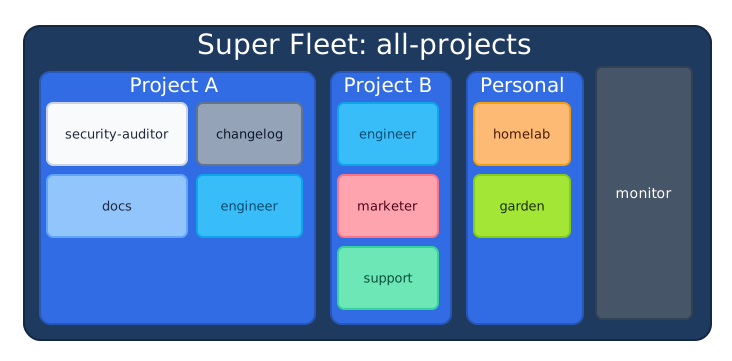
Section titled “Fleet Composition”Fleet composition allows multiple fleet configurations to be combined into a single unified fleet. A root fleet can reference sub-fleets, and sub-fleets can reference their own sub-fleets, forming a tree of arbitrary depth. At runtime, the entire tree is flattened into a single list of agents with metadata about their position in the hierarchy.
Why Fleet Composition Exists
Section titled “Why Fleet Composition Exists”Real engineering organizations manage multiple projects, each with their own agents. Fleet composition mirrors this structure: define agents per-project in their own herdctl.yaml, then compose them into a single super-fleet that one instance of herdctl manages.
Schema
Section titled “Schema”A fleet config can have both fleets (sub-fleet references) and agents (direct agent references), or either one alone:
# Root fleet: composes two project fleets plus a global monitor agentversion: 1fleet:  name: all-projects
web:  enabled: true  port: 3232
fleets:  - path: ./herdctl/herdctl.yaml    name: herdctl    overrides:      web:        enabled: false  - path: ./other-project/herdctl.yaml    overrides:      web:        enabled: false
agents:  - path: ./global-agents/monitor.yaml
Each sub-fleet YAML is itself a valid standalone fleet config. It parses through FleetConfigSchema independently, which means sub-fleets can be used standalone or composed into a larger fleet.
Recursive Loading
Section titled “Recursive Loading”The loadConfig() function handles fleet composition internally. When it encounters a fleets array, it recursively loads each referenced fleet config, resolves its agents, and appends them to the flat output list. The algorithm:
- Parse and validate the root fleet config.
- Load root-level agents (these get
fleetPath: []). - For each entry in
fleets: a. Resolve the path relative to the current config’s directory. b. Check the visited-paths set for cycles (see Cycle Detection). c. Read and parse the sub-fleet YAML. d. Resolve the sub-fleet’s name (see Fleet Naming). e. Validate no name collision at this level. f. Apply fleet-level overrides from the parent. g. Suppress sub-fleet web config by default. h. Compute effective defaults for the sub-fleet’s agents. i. Load all agents from the sub-fleet with the computedfleetPath. j. Recurse into the sub-fleet’s ownfleetsarray. - Return the full flat agent list.
The public API signature of loadConfig() is unchanged — callers receive a flat ResolvedConfig regardless of whether fleet composition is used. The hierarchy is a config-loading concern, not a runtime concern.
Qualified Names
Section titled “Qualified Names”Every agent receives a computed qualifiedName that encodes its position in the fleet hierarchy. The qualified name is a dot-separated path formed from the fleet hierarchy segments followed by the agent’s local name:
| Fleet Path | Agent Name | Qualified Name |
|---|---|---|
[] (root) | monitor | monitor |
["herdctl"] | security-auditor | herdctl.security-auditor |
["herdctl"] | engineer | herdctl.engineer |
["other-project"] | security-auditor | other-project.security-auditor |
["other-project", "frontend"] | designer | other-project.frontend.designer |
Key rules:
- The root fleet’s name is not included in qualified names. There is only one root, so including it would add noise without disambiguation value.
- Agents directly on the root fleet have
qualifiedName === name. Single-fleet setups (nofleetsarray) are completely unaffected. - The dot separator is unambiguous because agent and fleet names cannot contain dots (enforced by
AGENT_NAME_PATTERN).
The qualifiedName is the primary key used throughout the runtime: scheduler lookups, job creation, state persistence, API routes, WebSocket subscriptions, event payloads, and log output.
export interface ResolvedAgent extends AgentConfig { configPath: string; // Absolute path to agent config file fleetPath: string[]; // Fleet hierarchy: ["herdctl"] or [] qualifiedName: string; // Computed: "herdctl.security-auditor" or "monitor"}Fleet Naming
Section titled “Fleet Naming”Sub-fleets need names to form qualified agent names. The name is resolved using a priority order:
- Parent’s explicit
nameon the fleet reference (highest priority). - Sub-fleet’s own
fleet.namefrom its config. - Directory name derived from the sub-fleet config file’s parent directory (fallback).
Fleet names must pass the same validation pattern as agent names (^[a-zA-Z0-9][a-zA-Z0-9_-]*$). This ensures dots remain reserved as the hierarchy separator.
Sub-fleet Hierarchy in the Web UI
Section titled “Sub-fleet Hierarchy in the Web UI”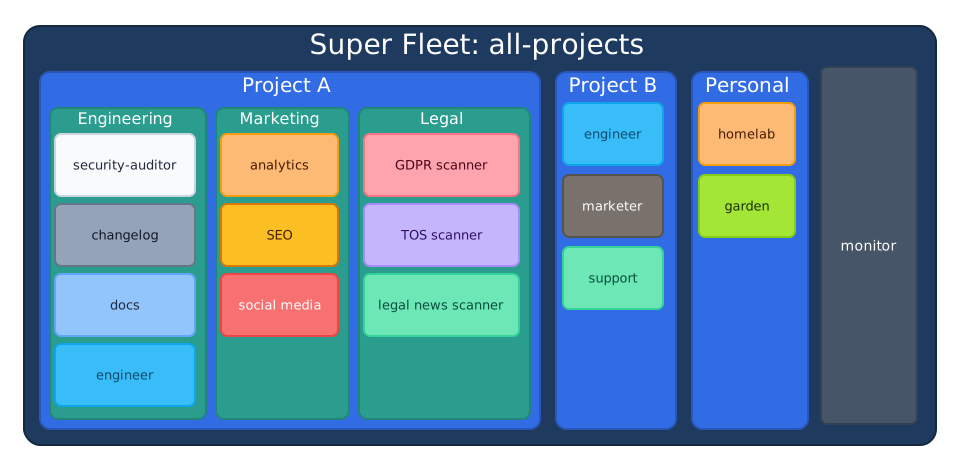
The web dashboard sidebar groups agents by their fleetPath, rendering sub-fleets as collapsible sections. Agents directly on the root appear ungrouped at the top level. Within each section, agents show their local name (not the full qualified name) alongside a status indicator.
Defaults Merging Across Levels
Section titled “Defaults Merging Across Levels”When fleets are composed, defaults cascade through the hierarchy with a specific priority order. For an agent inside a sub-fleet, the merge order from lowest to highest priority is:
- Super-fleet
defaults— Gap-filler. Provides values only where nothing else does. - Sub-fleet
defaults— The sub-fleet’s own default values for its agents. - Agent’s own config — The agent’s explicit values.
- Per-agent
overridesfrom the sub-fleet’sagentsentry. - Per-fleet
overridesfrom the super-fleet’sfleetsentry (highest priority, but only fleet-level fields — does not reach into individual agent configs).
This means a super-fleet’s defaults fill gaps but do not forcefully override a sub-fleet’s decisions. If the super-fleet needs to forcefully override something, it uses the overrides field on the fleet reference.
Web Config Suppression
Section titled “Web Config Suppression”By default, only the root fleet’s web configuration is honored. Sub-fleet web configurations are automatically suppressed (web.enabled = false) during recursive loading. This ensures a single web dashboard instance serves all agents across all nested fleets. If a parent fleet explicitly sets web in its overrides for a sub-fleet reference, that override is respected.
Cycle Detection
Section titled “Cycle Detection”The loader maintains a visitedPaths: Set<string> of absolute config file paths as it descends the fleet tree. Before loading any sub-fleet, it checks whether the resolved path has already been visited. If a cycle is detected, it throws FleetCycleError with the full path chain showing exactly where the cycle occurs:
Fleet composition cycle detected: /root.yaml -> /project-a/herdctl.yaml -> /shared/herdctl.yaml -> /project-a/herdctl.yamlFleet Name Collisions
Section titled “Fleet Name Collisions”If two sub-fleets at the same level resolve to the same fleet name (after the naming resolution described above), the loader throws FleetNameCollisionError at startup with an actionable message:
Fleet name collision at level "herdctl": two sub-fleets resolve to name "project-a".Conflicting references: ./project-a/herdctl.yaml, ./renamed-a/herdctl.yamlAdd explicit "name" overrides to disambiguate.Fleet-Level Overrides
Section titled “Fleet-Level Overrides”Overrides on a fleet reference apply to top-level fields of the sub-fleet’s config only (e.g., web, defaults, webhooks). A parent fleet cannot reach into individual agent configs within a sub-fleet through fleet-level overrides. If you need to override a specific agent’s configuration, import that agent directly as an agent reference with overrides rather than as part of a sub-fleet.
Agent Import
Section titled “Agent Import”Importing a sub-fleet imports all of its agents. There is no selective agent import mechanism. If a fleet contains agents you do not need, restructure the fleet definitions or import agents individually.
Config Reload
Section titled “Config Reload”FleetManager supports hot-reloading configuration without restarting the fleet process. The ConfigReload module in packages/core/src/fleet-manager/config-reload.ts implements this:
- Load and validate the new configuration (full recursive resolution for composed fleets).
- If validation fails, keep the old configuration and re-throw the error. The fleet continues operating with the previous valid config.
- Compute a diff between old and new configurations using
computeConfigChanges(). The diff usesqualifiedNameas the comparison key, so changes to agents in sub-fleets are correctly detected. - Update the stored configuration.
- Update the scheduler with the new agent list.
- Emit a
config:reloadedevent with the change summary.
Running jobs continue with their original configuration. Only new jobs use the reloaded configuration.
The computeConfigChanges() function produces a list of ConfigChange objects categorized as added, removed, or modified for both agents and schedules. Change names use qualified names (e.g., herdctl.security-auditor for an agent, herdctl.security-auditor/audit for a schedule).
The reload() method exists on FleetManager but is not triggered automatically. There is no file watcher or signal handler built in — callers invoke fleet.reload() explicitly (e.g., from a CLI command or web UI action).
Error Handling
Section titled “Error Handling”The configuration system defines a typed error hierarchy rooted at ConfigError. Each error class includes contextual information for diagnosing the problem:
| Error Class | When Thrown |
|---|---|
ConfigError | Base class for all configuration errors |
ConfigNotFoundError | No herdctl.yaml found after walking up the directory tree |
YamlSyntaxError | Invalid YAML syntax (includes line and column numbers) |
SchemaValidationError | Zod schema validation failed (includes per-field issue details) |
FileReadError | A config file could not be read from disk |
AgentLoadError | An agent YAML file failed to load (wraps the underlying error) |
AgentValidationError | Agent config failed Zod validation (includes file path) |
UndefinedVariableError | ${VAR} referenced an undefined variable with no default |
FleetCycleError | Fleet composition cycle detected (includes full path chain) |
FleetNameCollisionError | Two sub-fleets at the same level resolve to the same name |
InvalidFleetNameError | A fleet name does not match the required identifier pattern |
FleetLoadError | A sub-fleet YAML file failed to load (includes referencing file) |
All errors extend ConfigError, which extends the standard Error class. Consumers can use instanceof checks for error discrimination. The safeLoadConfig() function provides a non-throwing alternative that returns a result object:
const result = await safeLoadConfig("./herdctl.yaml");if (result.success) { const config = result.data;} else { console.error(result.error.message);}Related Pages
Section titled “Related Pages”- System Architecture Overview — How ConfigLoader fits into FleetManager and the broader system
- State Persistence — How agent state is stored using qualified names as directory keys
- Schedule System — How parsed schedule configs drive the polling loop
- Work Source System — How work source configs from agents and defaults are resolved