
HTTP API
The HTTP API is a thin REST layer over FleetManager. Like the CLI, it contains no business logic of its own — every endpoint delegates to a FleetManager method and returns the result. The API powers the web dashboard and can be consumed by external scripts, CI/CD pipelines, or custom integrations.
Design Principles
Section titled “Design Principles”The API follows the same thin client principle as every other interaction layer in herdctl:
- FleetManager is the single source of truth. Every REST endpoint calls a FleetManager method. No endpoint reads state files directly or manages agent lifecycle on its own.
- REST for queries and commands, WebSocket for real-time events. Clients fetch initial state via REST and receive incremental updates via a single WebSocket connection.
- No authentication (MVP). The API is designed for local use on
localhost. Authentication is planned but not yet implemented. - Consistent error responses. All errors return a JSON object with
errorandstatusCodefields.
Server Architecture
Section titled “Server Architecture”Fastify
Section titled “Fastify”The HTTP API uses Fastify as its server framework. Fastify was chosen over Express for its TypeScript-first design, built-in WebSocket support via @fastify/websocket, plugin architecture, and request/response schema validation.
The server is created by the createWebServer() factory function in packages/web/src/server/index.ts. It registers:
- CORS via
@fastify/cors(allows localhost origins for development) - WebSocket via
@fastify/websocket - Static file serving via
@fastify/static(serves the built React SPA) - REST route modules for fleet, agents, jobs, schedules, and chat
- SPA fallback handler that serves
index.htmlfor client-side routing
WebManager Lifecycle
Section titled “WebManager Lifecycle”WebManager is the IChatManager implementation for the web platform. FleetManager dynamically imports @herdctl/web at startup when the fleet configuration includes a web block with enabled: true. WebManager follows the same lifecycle as the Discord and Slack managers:
FleetManager.initialize() -> WebManager.initialize() # Creates Fastify server, registers routes -> FleetManager.start() -> WebManager.start() # Starts listening on host:port, starts FleetBridge -> FleetManager.stop() -> WebManager.stop() # Stops FleetBridge, closes WebSocket connections, shuts down FastifyThe server binds to the host and port specified in herdctl.yaml:
web: enabled: true port: 3232 host: localhostRoute Registration
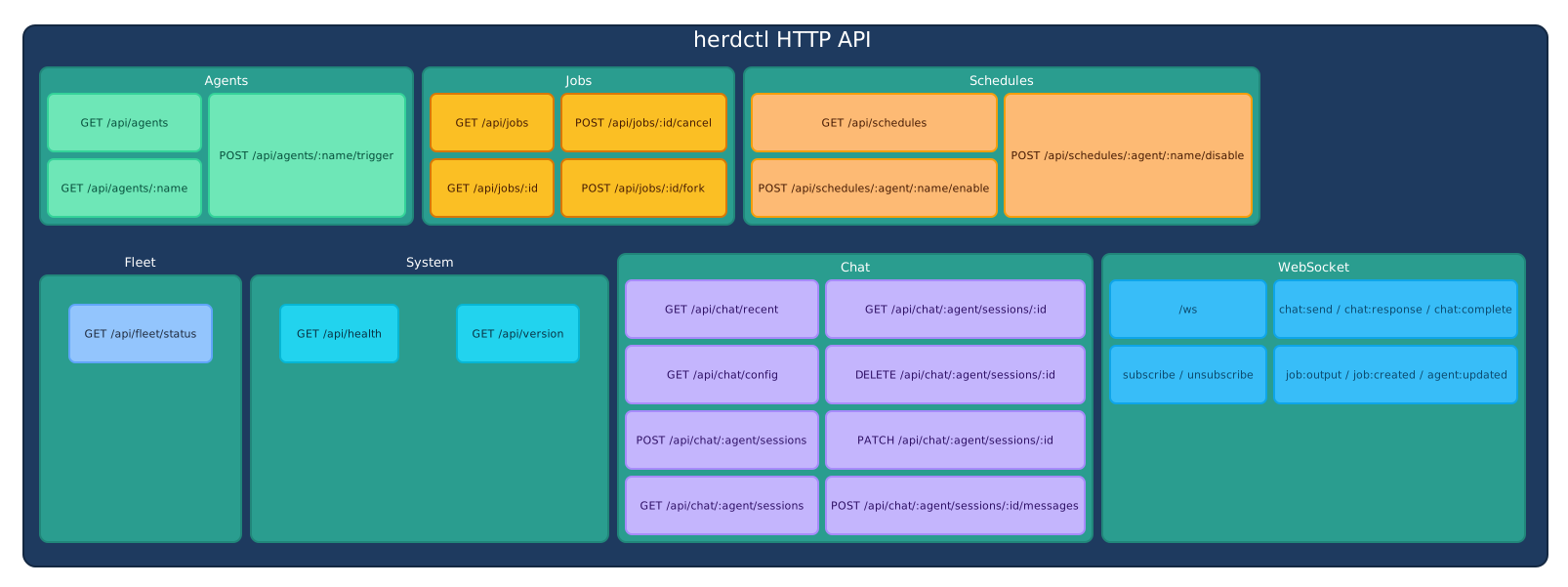
Section titled “Route Registration”Routes are organized into focused modules, each receiving the Fastify instance and FleetManager reference:
| Module | File | Endpoints |
|---|---|---|
| Fleet | routes/fleet.ts | Fleet status |
| Agents | routes/agents.ts | Agent listing and detail |
| Jobs | routes/jobs.ts | Job listing, detail, cancel, fork |
| Schedules | routes/schedules.ts | Schedule listing, trigger, enable/disable |
| Chat | routes/chat.ts | Chat session management and messaging |
| System | index.ts (inline) | Health check, version |
REST Endpoint Reference
Section titled “REST Endpoint Reference”All endpoints are prefixed with /api. Responses are JSON.
| Method | Path | Description | FleetManager Method |
|---|---|---|---|
GET | /api/fleet/status | Fleet status including state, uptime, agent count, job counts, scheduler state | getFleetStatus() |
Example response:
{ "status": "running", "startedAt": "2025-01-20T10:00:00Z", "agentCount": 3, "runningJobCount": 1, "schedulerState": "running"}Agents
Section titled “Agents”| Method | Path | Description | FleetManager Method |
|---|---|---|---|
GET | /api/agents | List all agents with status, schedules, and connector info | getAgentInfo() |
GET | /api/agents/:name | Get detailed info for a single agent by qualified name or local name | getAgentInfoByName(name) |
The :name parameter accepts either a qualified name (e.g., herdctl.security-auditor) or a local name (e.g., security-auditor). If the agent is not found, the endpoint returns 404.
Example response for GET /api/agents/:name:
{ "name": "security-auditor", "qualifiedName": "herdctl.security-auditor", "description": "Runs security audits on the codebase", "status": "idle", "currentJobId": null, "lastJobId": "job-2025-01-20-abc123", "schedules": [ { "name": "daily-audit", "type": "cron", "expression": "0 6 * * *", "status": "idle", "lastRunAt": "2025-01-20T06:00:00Z", "nextRunAt": "2025-01-21T06:00:00Z" } ], "chatConnectors": { "discord": { "status": "connected" }, "slack": { "status": "disconnected" } }}| Method | Path | Description | FleetManager Method |
|---|---|---|---|
GET | /api/jobs | List jobs with pagination and filtering | listJobs() (core utility) |
GET | /api/jobs/:id | Get full metadata for a single job | getJob() (core utility) |
POST | /api/jobs/:id/cancel | Cancel a running job | cancelJob(id) |
POST | /api/jobs/:id/fork | Fork a job, optionally with a new prompt | forkJob(id, modifications) |
Query parameters for GET /api/jobs:
| Parameter | Type | Default | Description |
|---|---|---|---|
limit | number | 50 | Max results (clamped to 1-100) |
offset | number | 0 | Pagination offset |
agentName | string | — | Filter by agent qualified name |
status | string | — | Filter by status: pending, running, completed, failed, cancelled |
Example response for GET /api/jobs:
{ "jobs": [ { "jobId": "job-2025-01-20-abc123", "agentName": "herdctl.security-auditor", "prompt": "Run daily security audit...", "status": "completed", "createdAt": "2025-01-20T06:00:00Z", "startedAt": "2025-01-20T06:00:00Z", "completedAt": "2025-01-20T06:05:30Z", "exitCode": 0, "sessionId": "claude-session-xyz", "triggerType": "scheduled", "workspace": "/home/user/projects/my-app" } ], "total": 142, "limit": 50, "offset": 0, "errors": []}Fork request body:
{ "prompt": "Try a different approach to the security issue"}The prompt field is optional. If omitted, the fork uses the original job’s configuration.
Schedules
Section titled “Schedules”| Method | Path | Description | FleetManager Method |
|---|---|---|---|
GET | /api/schedules | List all schedules across all agents | getSchedules() |
POST | /api/agents/:name/trigger | Trigger a job for an agent, optionally targeting a specific schedule | trigger(name, scheduleName, options) |
POST | /api/schedules/:agentName/:scheduleName/enable | Enable a disabled schedule | enableSchedule(agentName, scheduleName) |
POST | /api/schedules/:agentName/:scheduleName/disable | Disable an active schedule | disableSchedule(agentName, scheduleName) |
Trigger request body:
{ "scheduleName": "issue-check", "prompt": "Custom prompt override"}Both fields are optional. If scheduleName is omitted, the agent’s default trigger behavior applies. If prompt is provided, it overrides the schedule’s configured prompt.
The chat API manages web chat sessions. Actual message streaming happens via the WebSocket protocol, but REST endpoints handle session lifecycle and provide a non-streaming message endpoint.
| Method | Path | Description |
|---|---|---|
GET | /api/chat/recent | List recent sessions across all agents (sorted by last activity) |
GET | /api/chat/config | Get chat configuration defaults (message grouping, tool results) |
POST | /api/chat/:agentName/sessions | Create a new chat session for an agent |
GET | /api/chat/:agentName/sessions | List all sessions for an agent |
GET | /api/chat/:agentName/sessions/:sessionId | Get session details with full message history |
DELETE | /api/chat/:agentName/sessions/:sessionId | Delete a chat session |
PATCH | /api/chat/:agentName/sessions/:sessionId | Rename a session (set custom name) |
POST | /api/chat/:agentName/sessions/:sessionId/messages | Send a message (non-streaming, waits for full response) |
Create session response (201 Created):
{ "sessionId": "a1b2c3d4-e5f6-7890-abcd-ef1234567890", "createdAt": "2025-01-20T12:00:00.000Z"}Session detail response:
{ "sessionId": "a1b2c3d4-e5f6-7890-abcd-ef1234567890", "agentName": "herdctl.my-agent", "createdAt": "2025-01-20T12:00:00.000Z", "lastMessageAt": "2025-01-20T12:05:30.000Z", "messageCount": 4, "preview": "What issues are open on the repo?", "customName": "Issue triage session", "messages": [ { "role": "user", "content": "What issues are open on the repo?", "timestamp": "2025-01-20T12:00:01.000Z" }, { "role": "assistant", "content": "I'll check the open issues for you...", "timestamp": "2025-01-20T12:00:03.000Z" }, { "role": "tool", "content": "Found 3 open issues...", "timestamp": "2025-01-20T12:00:05.000Z", "toolCall": { "toolName": "Bash", "inputSummary": "gh issue list --state open", "output": "Found 3 open issues...", "isError": false, "durationMs": 1200 } } ]}Send message request body:
{ "message": "What issues are open on the repo?"}The REST message endpoint collects all streaming chunks and returns the complete response synchronously. For real-time streaming, use the WebSocket chat:send message type instead.
Rename request body:
{ "name": "Issue triage session"}System
Section titled “System”| Method | Path | Description |
|---|---|---|
GET | /api/health | Health check (returns { status: "ok", timestamp }) |
GET | /api/version | Package versions for web, CLI, and core |
Health check response:
{ "status": "ok", "timestamp": "2025-01-20T12:00:00.000Z"}Version response:
{ "web": "0.5.0", "cli": "0.5.0", "core": "0.5.0"}WebSocket Protocol
Section titled “WebSocket Protocol”The API provides a single WebSocket endpoint at /ws. Clients open one connection and receive all event types multiplexed over that connection. This avoids the complexity of managing multiple connections and simplifies reconnection logic.
Connection Lifecycle
Section titled “Connection Lifecycle”- Client connects to
ws://localhost:3232/ws - Server immediately sends a
fleet:statusmessage with a full fleet status snapshot - Client sends
subscribemessages for agents whose output it wants to stream - Server broadcasts events as they occur
- Client sends
pingmessages periodically for keepalive; server responds withpong - On disconnect, the server cleans up the client’s subscription state
Client Messages
Section titled “Client Messages”Messages sent from the browser to the server:
| Type | Payload | Description |
|---|---|---|
subscribe | { agentName } | Subscribe to an agent’s job:output events |
unsubscribe | { agentName } | Stop receiving an agent’s job:output events |
ping | (none) | Keepalive ping |
chat:send | { agentName, sessionId, message } | Send a chat message to an agent |
Example subscribe message:
{ "type": "subscribe", "payload": { "agentName": "herdctl.security-auditor" }}Example chat send message:
{ "type": "chat:send", "payload": { "agentName": "herdctl.my-agent", "sessionId": "a1b2c3d4-e5f6-7890-abcd-ef1234567890", "message": "Check the open issues" }}Server Messages
Section titled “Server Messages”Messages sent from the server to connected browsers:
Fleet and Agent Events
Section titled “Fleet and Agent Events”| Type | Payload | Broadcast Scope | Description |
|---|---|---|---|
fleet:status | FleetStatus | Single client | Full fleet snapshot, sent on connection |
agent:updated | AgentStartedPayload or AgentStoppedPayload | All clients | Agent lifecycle change |
Job Events
Section titled “Job Events”| Type | Payload | Broadcast Scope | Description |
|---|---|---|---|
job:created | JobCreatedPayload | All clients | New job started |
job:output | JobOutputPayload | Subscribed clients only | Streaming job output (high volume) |
job:completed | JobCompletedPayload | All clients | Job finished successfully |
job:failed | JobFailedPayload | All clients | Job failed with error |
job:cancelled | JobCancelledPayload | All clients | Job was cancelled |
Schedule Events
Section titled “Schedule Events”| Type | Payload | Broadcast Scope | Description |
|---|---|---|---|
schedule:triggered | ScheduleTriggeredPayload | All clients | A schedule fired |
Chat Events
Section titled “Chat Events”| Type | Payload | Broadcast Scope | Description |
|---|---|---|---|
chat:response | { agentName, sessionId, jobId, chunk } | Requesting client | Streaming text chunk from agent |
chat:tool_call | { agentName, sessionId, jobId, toolName, inputSummary?, output, isError, durationMs? } | Requesting client | Tool call result during chat |
chat:message_boundary | { agentName, sessionId, jobId } | Requesting client | Boundary between distinct assistant text turns |
chat:complete | { agentName, sessionId, jobId } | Requesting client | Chat response finished |
chat:error | { agentName, sessionId, error } | Requesting client | Chat error occurred |
Keepalive
Section titled “Keepalive”| Type | Payload | Description |
|---|---|---|
pong | (none) | Response to client ping |
Subscription-Based Filtering
Section titled “Subscription-Based Filtering”Not all events are sent to all clients. The FleetBridge distinguishes between low-volume events (broadcast to all clients) and high-volume events (sent only to subscribed clients):
- Broadcast to all:
fleet:status,agent:updated,job:created,job:completed,job:failed,job:cancelled,schedule:triggered - Subscribers only:
job:output(sent only to clients that have sent asubscribemessage for the relevant agent) - Requesting client only: All
chat:*messages (sent only to the client that initiated thechat:send)
This filtering prevents flooding inactive dashboard tabs with high-volume output data from agents the user is not viewing.
FleetBridge: Event Relay
Section titled “FleetBridge: Event Relay”The FleetBridge class connects FleetManager’s event system to WebSocket clients. It subscribes to FleetManager events at startup and translates them into WebSocket server messages:
FleetManager Events          FleetBridge           WebSocket Clients
agent:started     -------->  broadcast()  -------->  All clientsagent:stopped     -------->  broadcast()  -------->  All clientsjob:created       -------->  broadcast()  -------->  All clientsjob:output        -------->  broadcastToSubscribers() --> Subscribed clientsjob:completed     -------->  broadcast()  -------->  All clientsjob:failed        -------->  broadcast()  -------->  All clientsjob:cancelled     -------->  broadcast()  -------->  All clientsschedule:triggered ------->  broadcast()  -------->  All clients
The FleetBridge properly cleans up event listeners when stopped, preventing memory leaks. It stores bound handler references so that fleetManager.off() calls remove the correct listeners.
Error Responses
Section titled “Error Responses”All error responses use a consistent structure:
{ "error": "Descriptive error message", "statusCode": 404}HTTP Status Codes
Section titled “HTTP Status Codes”| Status Code | Usage |
|---|---|
200 | Successful GET, POST, PATCH, DELETE |
201 | Resource created (e.g., new chat session) |
400 | Invalid request (missing required fields, malformed input) |
404 | Resource not found (agent, job, session) |
500 | Internal server error |
503 | Client build not available (SPA not built) |
Error detection is string-based: if a FleetManager error message contains “not found” (case-insensitive), the API returns 404. All other errors return 500. This approach avoids coupling the API layer to specific error class hierarchies while still providing meaningful status codes.
CORS Configuration
Section titled “CORS Configuration”The server configures CORS via @fastify/cors to allow requests from known development origins:
http://localhost:3232andhttp://127.0.0.1:3232(production server)http://localhost:5173andhttp://127.0.0.1:5173(Vite dev server)- The configured
host:portcombination from the web config
Allowed methods are GET, POST, PUT, DELETE, and OPTIONS.
Authentication
Section titled “Authentication”The API is designed for local use. Security is handled at the network level:
- Default binding: The server binds to
localhostby default, preventing LAN access. - Warning on exposure: When
hostis set to0.0.0.0, the web dashboard displays a warning about the security implications. - Reverse proxy pattern: For remote access, the recommended approach is placing a reverse proxy (Caddy, Nginx + OAuth2 Proxy, Authelia) in front of the herdctl server. The proxy handles authentication and sets headers like
X-Forwarded-User.
The Fastify plugin architecture supports adding authentication middleware without restructuring routes. When authentication is added, it will be injected as a Fastify preHandler hook that checks all /api/* routes.
Planned authentication options:
- Bearer token — A simple
auth_tokenconfig field. When set, the server requiresAuthorization: Bearer <token>on all HTTP requests and the initial WebSocket handshake. - API keys — Token-based auth for scripts and CI integrations.
- OIDC/OAuth — Enterprise SSO integration for multi-user deployments.
Chat Integration
Section titled “Chat Integration”The web chat system uses WebChatManager to manage chat sessions. Unlike the monitoring endpoints that purely query FleetManager state, the chat system maintains its own persistent state for conversation history.
Session Model
Section titled “Session Model”Chat sessions are server-managed, per-agent, and shared:
- Sessions are stored in
.herdctl/web/chat-history/<agentName>/<sessionId>.json - Each agent can have multiple concurrent chat sessions
- Sessions are visible to all connected browsers (no per-user scoping)
- Session IDs are server-generated UUIDs
- Sessions expire after
session_expiry_hours(default: 24 hours)
There is no concept of user identity in the web API. Any browser can see, continue, or delete any session. This design reflects the typical use case: a single operator (or small team) using the dashboard on localhost.
Message Flow
Section titled “Message Flow”When a user sends a chat message, the flow differs depending on whether they use the REST or WebSocket interface:
REST path (POST /api/chat/:agentName/sessions/:sessionId/messages):
- Validate session exists
- Call
WebChatManager.sendMessage()with a chunk collector callback - Wait for the agent to complete its response
- Return the full accumulated response
WebSocket path (chat:send message):
- Validate session exists via WebChatManager
- Call
WebChatManager.sendMessage()with streaming callbacks - Stream
chat:responsechunks,chat:tool_callresults, andchat:message_boundarysignals back to the requesting client in real time - Send
chat:completewhen finished (orchat:erroron failure)
Both paths use the same underlying WebChatManager.sendMessage() method, which triggers a FleetManager job with triggerType: "web" and streams the agent’s response via SDK message callbacks. The @herdctl/chat package’s ChatSessionManager handles SDK session tracking for conversation continuity across multiple messages.
SPA Serving
Section titled “SPA Serving”The Fastify server doubles as a static file server for the React SPA. In production, Vite builds the client to dist/client/, and @fastify/static serves these files from the root path /.
A custom setNotFoundHandler implements SPA fallback routing:
- Requests to
/api/*,/ws, or/assets/*that don’t match a route return404 - All other requests serve
index.html, allowing React Router to handle client-side routing - If the client build doesn’t exist (e.g., development mode), the server returns
503with a message to runpnpm build:client
Development vs Production
Section titled “Development vs Production”| Aspect | Development | Production |
|---|---|---|
| Frontend | Vite dev server on port 5173 with HMR | Pre-built static files served by Fastify |
| API server | Fastify on configured port | Fastify on configured port |
| Proxy | Vite proxies /api/* and /ws/* to Fastify | Everything on a single port |
| CORS | Required (cross-origin between Vite and Fastify) | Not needed (same origin) |
| npm package | Server code only | Server code + pre-built SPA assets |
Related Pages
Section titled “Related Pages”- System Architecture — Overall system design, FleetManager composition, event system
- Web Dashboard — React frontend architecture, UI components, state management
- Chat Infrastructure — Shared chat layer used by WebChatManager
- Job Lifecycle — Job creation, status transitions, output streaming
- Schedule System — Polling loop, interval/cron parsing, trigger mechanics
- CLI — The other thin client over FleetManager