
System Architecture Overview
This page is the entry point for the herdctl architecture section. It describes the overall shape of the system: what the major subsystems are, how they relate to each other, and how data flows at runtime. Start here before diving into any individual subsystem.
System Architecture Diagram
Section titled “System Architecture Diagram”The following diagram shows how @herdctl/core sits at the center of the system, with FleetManager orchestrating all internal modules and exposing a unified API to every interaction layer.

Package Dependency Graph
Section titled “Package Dependency Graph”herdctl is organized as a monorepo with six npm packages. Dependencies flow strictly in one direction: interaction-layer packages depend on core, never the reverse.

| Package | npm Name | Role |
|---|---|---|
| core | @herdctl/core | All business logic: configuration, state, runner, scheduler, work sources, FleetManager orchestration. Every other package depends on this. |
| chat | @herdctl/chat | Shared chat infrastructure: session management, streaming response buffering, message extraction, error handling. Used by Discord and Slack connectors. |
| discord | @herdctl/discord | Discord connector: discord.js client, slash commands, mention handling, per-agent bot model. Depends on core and chat. |
| slack | @herdctl/slack | Slack connector: Bolt App, Socket Mode, prefix commands, channel-to-agent routing, single-app model. Depends on core and chat. |
| web | @herdctl/web | Web dashboard and HTTP API: Vite + React frontend, Fastify backend, real-time event streaming. Depends on core. |
| cli | herdctl | Command-line interface: thin wrapper over FleetManager. Depends on core. |
Core never imports from any interaction-layer package. Instead, FleetManager discovers optional packages (@herdctl/discord, @herdctl/slack, @herdctl/web) at runtime via dynamic imports when the fleet configuration references them. This avoids hard dependencies on optional packages that a user may not have installed.
Core Design Principles
Section titled “Core Design Principles”Library-First Design
Section titled “Library-First Design”All business logic lives in @herdctl/core. The CLI, web dashboard, HTTP API, and chat connectors are thin wrappers that delegate to FleetManager. A developer can use @herdctl/core directly as a library without any interaction layer:
import { FleetManager } from "@herdctl/core";
const fleet = new FleetManager({  configPath: "./agents",  stateDir: "./.herdctl",});
await fleet.initialize();await fleet.start();
// Subscribe to eventsfleet.on("job:completed", (payload) => {  console.log(`Job ${payload.job.id} finished in ${payload.durationSeconds}s`);});
// Query stateconst status = fleet.getFleetStatus();
// Trigger manuallyawait fleet.trigger("my-agent");
// Shut downawait fleet.stop({ waitForJobs: true, timeout: 30000 });
Thin Clients
Section titled “Thin Clients”Each interaction layer adds only what is specific to its medium:
- CLI adds argument parsing, output formatting, and exit code handling.
- Web adds HTTP routing, SSE/WebSocket transport, and React rendering.
- Discord adds discord.js event handling, slash commands, and rich embeds.
- Slack adds Bolt event handling, Socket Mode, and mrkdwn conversion.
None of these packages contain business logic. They translate between their medium and FleetManager’s API.
Single Process Model
Section titled “Single Process Model”A fleet runs in a single Node.js process. FleetManager manages the scheduler loop, configuration, and state within that process. Agents are executed as child processes (via the Claude SDK or CLI) or as Docker containers, but FleetManager itself is not distributed.
Module Composition
Section titled “Module Composition”FleetManager uses composition rather than inheritance. Internal functionality is split into focused module classes that each receive a shared FleetManagerContext interface. This keeps individual files small and testable while presenting a single public API surface. See Module Composition Pattern below for details.
FleetManager: The Central Orchestrator
Section titled “FleetManager: The Central Orchestrator”FleetManager is the single orchestration point for the entire system. All interaction layers go through FleetManager rather than calling lower-level modules directly.
What FleetManager Owns
Section titled “What FleetManager Owns”| Responsibility | Description |
|---|---|
| Lifecycle management | initialize(), start(), stop(), reload() — full fleet lifecycle |
| Configuration loading | Delegates to ConfigLoader to discover, parse, validate, and resolve herdctl.yaml |
| State directory setup | Delegates to StateManager to create and manage the .herdctl/ directory |
| Scheduler creation | Creates and controls the Scheduler instance with trigger callbacks routed back into FleetManager |
| Job execution | Creates jobs via JobManager, hands execution to the Runner, streams output, reports completion |
| Event emission | Typed events for all lifecycle transitions, consumed by the web dashboard, CLI, and library consumers |
| Chat manager loading | Dynamically imports and initializes Discord, Slack, and Web managers when configured |
| Schedule control | Enable/disable schedules at runtime without editing config files |
| Hot config reload | Reload configuration without restarting; running jobs continue with their original config |
What FleetManager Delegates
Section titled “What FleetManager Delegates”| Component | Source | Responsibility |
|---|---|---|
| ConfigLoader | config/ | Discovers herdctl.yaml, parses YAML, validates with Zod schemas, resolves fleet composition (sub-fleets), merges defaults, interpolates environment variables. See Configuration System. |
| Scheduler | scheduler/ | Polling loop that checks agent schedules (interval and cron). Evaluates trigger conditions, respects concurrency limits, fires callbacks into FleetManager. See Schedule System. |
| StateManager | state/ | Manages the .herdctl/ directory: fleet state (state.yaml), job metadata (YAML), streaming output (JSONL), and session info (JSON). All writes are atomic. See State Persistence. |
| Runner | runner/ | Executes agents. The SDK adapter transforms agent config into Claude SDK options. Supports SDK runtime, CLI runtime, and Docker runtime. Streams messages in real time. See Agent Execution Engine. |
| JobManager | fleet-manager/job-manager.ts | Manages job lifecycle: creation, queuing, priority, retention, and output streaming. Works with the Runner to track active jobs. See Job Lifecycle. |
| Chat Managers | @herdctl/web, @herdctl/discord, @herdctl/slack | Dynamically loaded by FleetManager when configured. The web manager serves the dashboard and API; chat managers bridge Discord and Slack to agents. See Chat Infrastructure, Discord, Slack, Web Dashboard. |
Module Composition Pattern
Section titled “Module Composition Pattern”FleetManager uses a module composition pattern. Each area of functionality is extracted into a focused class that receives a FleetManagerContext interface at construction time:
| Module Class | File | Responsibility |
|---|---|---|
StatusQueries | status-queries.ts | Fleet status, agent info, schedule info queries |
ScheduleManagement | schedule-management.ts | Enable/disable schedules, query schedule state |
ScheduleExecutor | schedule-executor.ts | Execute triggered schedules via the Runner |
JobControl | job-control.ts | Trigger, cancel, and fork jobs |
LogStreaming | log-streaming.ts | Async iterable log streams for fleet, job, and agent output |
ConfigReload | config-reload.ts | Hot-reload configuration, compute config diffs |
The FleetManagerContext Interface
Section titled “The FleetManagerContext Interface”Each module class is instantiated once in the FleetManager constructor. Rather than passing individual dependencies to every method call, modules access shared state through the FleetManagerContext interface:
export interface FleetManagerContext { getConfig(): ResolvedConfig | null; getStateDir(): string; getStateDirInfo(): StateDirectory | null; getLogger(): FleetManagerLogger; getScheduler(): Scheduler | null; getStatus(): FleetManagerStatus; getInitializedAt(): string | null; getStartedAt(): string | null; getStoppedAt(): string | null; getLastError(): string | null; getCheckInterval(): number; emit(event: string, ...args: unknown[]): boolean; getEmitter(): EventEmitter; getChatManager?(platform: string): IChatManager | undefined; getChatManagers?(): Map<string, IChatManager>; trigger(agentName: string, scheduleName?: string, options?: TriggerOptions): Promise<TriggerResult>;}FleetManager implements this interface and passes itself (this) to each module. The modules call context getters to access current state, and call emit() to fire events. This pattern provides one-way dependency flow (modules depend on context, never on each other) and keeps each module independently testable with a mock context.
How It Fits Together
Section titled “How It Fits Together”FleetManager (extends EventEmitter, implements FleetManagerContext) ├── StatusQueries(this) → getFleetStatus(), getAgentInfo(), ... ├── ScheduleManagement(this) → getSchedules(), enableSchedule(), ... ├── ScheduleExecutor(this) → executeSchedule() ├── JobControl(this) → trigger(), cancelJob(), forkJob() ├── LogStreaming(this) → streamLogs(), streamJobOutput(), ... └── ConfigReload(this) → reload()FleetManager’s public API delegates directly to these modules. For example, fleet.getFleetStatus() calls this.statusQueries.getFleetStatus(). The public interface remains a single class with a clean API; the implementation is spread across focused files.
Event System
Section titled “Event System”FleetManager extends Node.js EventEmitter and provides strongly-typed events for every lifecycle transition. The event system is what powers real-time updates in the web dashboard, live log streaming in the CLI, and monitoring in library consumers.
Event Catalog
Section titled “Event Catalog”Lifecycle events:
| Event | Payload | When Emitted |
|---|---|---|
initialized | (none) | Config loaded, state directory ready |
started | (none) | Scheduler running, schedules being monitored |
stopped | (none) | All jobs completed or timed out, scheduler stopped |
error | Error | Unhandled error not tied to a specific job |
Configuration events:
| Event | Payload | When Emitted |
|---|---|---|
config:reloaded | { agentCount, agentNames, configPath, changes[], timestamp } | Configuration hot-reloaded from disk |
Agent events:
| Event | Payload | When Emitted |
|---|---|---|
agent:started | { agent, timestamp } | Agent registered with the fleet |
agent:stopped | { agentName, timestamp, reason? } | Agent unregistered from the fleet |
Schedule events:
| Event | Payload | When Emitted |
|---|---|---|
schedule:triggered | { agentName, scheduleName, schedule, timestamp } | Schedule fires, before job creation |
schedule:skipped | { agentName, scheduleName, reason, timestamp } | Schedule check skipped (already running, disabled, concurrency limit, empty work source) |
Job events:
| Event | Payload | When Emitted |
|---|---|---|
job:created | { job, agentName, scheduleName?, timestamp } | New job created (status: pending) |
job:output | { jobId, agentName, output, outputType, timestamp } | Job produces output during execution |
job:completed | { job, agentName, exitReason, durationSeconds, timestamp } | Job finishes successfully |
job:failed | { job, agentName, error, exitReason, durationSeconds?, timestamp } | Job fails with error |
job:cancelled | { job, agentName, terminationType, durationSeconds?, timestamp } | Job cancelled (graceful, forced, or already stopped) |
job:forked | { job, originalJob, agentName, timestamp } | New job created by forking an existing job’s session |
Event Consumers
Section titled “Event Consumers”- Web dashboard: Subscribes to all events via SSE/WebSocket to update the UI in real time.
- CLI: Subscribes to
job:outputfor live log streaming duringherdctl logs --follow. - Library consumers: Subscribe to any event for custom monitoring, alerting, or integration.
- Chat managers: Subscribe to job events to stream agent responses back to Discord/Slack channels.
Initialization Flow
Section titled “Initialization Flow”When a consumer calls initialize() followed by start(), the following sequence occurs:
- Load configuration — ConfigLoader discovers and parses
herdctl.yaml, loads all agent configs, resolves fleet composition (sub-fleets), merges defaults, and returns aResolvedConfig. - Initialize state directory — StateManager creates the
.herdctl/directory structure if it does not exist, including subdirectories for jobs and sessions. - Create Scheduler — A new Scheduler instance is created with agent definitions and a trigger callback that routes back into FleetManager.
- Load chat managers — FleetManager dynamically imports
@herdctl/discord,@herdctl/slack, and@herdctl/webif agents or fleet config reference them. This avoids hard dependencies on optional packages. - Start scheduler — On
start(), the Scheduler begins its polling loop, checking all agent schedules on each tick.
The FleetManager tracks its own lifecycle through a state machine: uninitialized -> initialized -> running -> stopping -> stopped. Operations that require a specific state (e.g., trigger() requires running) throw InvalidStateError if called at the wrong time.
Runtime Flow
Section titled “Runtime Flow”Once started, the system follows a continuous loop:
- Scheduler polls — On each tick (default: every 1 second), the Scheduler checks every agent’s schedules against their state (last run time, concurrency limits, enabled/disabled status).
- Schedule fires — When a schedule is due, the Scheduler calls FleetManager’s trigger callback with agent and schedule information. FleetManager emits
schedule:triggered. - Job created — FleetManager creates a job record via JobManager and StateManager. The job starts in
pendingstatus. FleetManager emitsjob:created. - Runner executes — The ScheduleExecutor hands the job to the Runner. The Runner transforms agent config via the SDK adapter, selects a runtime (SDK, CLI, or Docker), invokes the agent, and streams messages back as they arrive.
- Output persisted — Each message is appended to the job’s JSONL file and emitted as a
job:outputevent. Consumers (web dashboard, CLI, library code) receive output in real time. - Job completes — The Runner reports completion or failure. StateManager updates
state.yamlwith the agent’s last run time and next trigger time. FleetManager emitsjob:completedorjob:failed.
This loop continues until stop() is called, at which point the Scheduler stops polling, running jobs optionally drain (with a configurable timeout), and the stopped event is emitted.
Agent Composition
Section titled “Agent Composition”Agents in herdctl are defined declaratively in YAML and resolved into ResolvedAgent objects at configuration time. Each agent specifies its system prompt, schedules, permissions, MCP servers, and optional chat configuration.
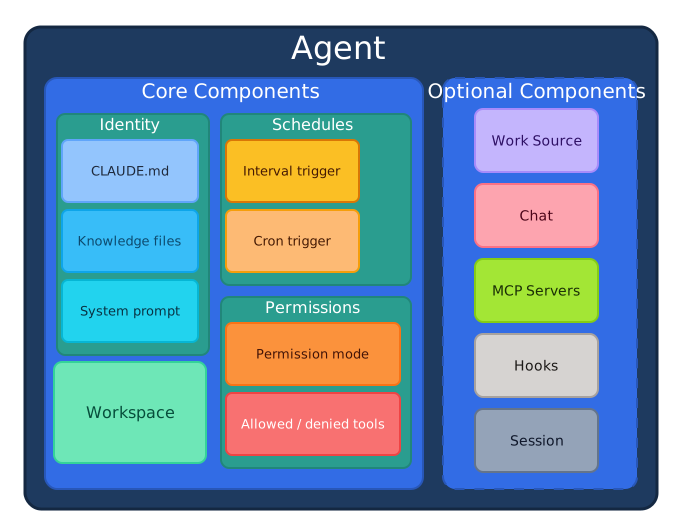
For details on agent configuration, see Configuration System. For details on how agents are executed, see Agent Execution Engine.
Error Handling
Section titled “Error Handling”FleetManager defines a typed error hierarchy rooted at FleetManagerError. All errors include a code string for programmatic discrimination and contextual information for debugging:
| Error Class | Code | When Thrown |
|---|---|---|
ConfigurationError | CONFIGURATION_ERROR | Config loading or validation failed |
AgentNotFoundError | AGENT_NOT_FOUND | Referenced agent does not exist in config |
JobNotFoundError | JOB_NOT_FOUND | Referenced job ID does not exist |
ScheduleNotFoundError | SCHEDULE_NOT_FOUND | Referenced schedule does not exist on the agent |
InvalidStateError | INVALID_STATE | Operation called in wrong lifecycle state |
ConcurrencyLimitError | CONCURRENCY_LIMIT | Agent or fleet-wide concurrency limit reached |
All errors extend FleetManagerError, which itself extends Error. TypeScript consumers can use instanceof checks or the code property for error discrimination.
Related Pages
Section titled “Related Pages”Architecture Deep Dives
Section titled “Architecture Deep Dives”- Configuration System — Config discovery, parsing, validation, fleet composition
- State Persistence —
.herdctl/directory, file formats, atomic writes - Agent Execution Engine — Runner module, SDK integration, runtime selection
- Schedule System — Polling loop, interval/cron parsing, concurrency
- Job Lifecycle — Job creation, status transitions, output streaming
- Work Source System — GitHub Issues integration, extensible work source interface
- Chat Infrastructure — Shared chat layer for Discord and Slack
- Discord Connector — Per-agent bot model, slash commands, discord.js
- Slack Connector — Single-app model, Socket Mode, Bolt
- Web Dashboard — Vite + React frontend, real-time updates
- CLI — Command structure, thin wrapper design
- Docker Runtime — Container execution, network config, security model
- HTTP API — REST endpoints, SSE streaming, webhook handling
API Reference
Section titled “API Reference”- FleetManager API Reference — Full API documentation with type signatures and examples