
State Persistence
herdctl uses a file-based state system to track agents, jobs, and sessions. All persistent state is stored in the .herdctl/ directory — no database required. The StateManager module within @herdctl/core provides the full API for reading, writing, and querying this state, while the FleetManager coordinates all state transitions during fleet operation.
Directory Structure
Section titled “Directory Structure”The .herdctl/ directory is created automatically in the project root when the fleet initializes. Its layout is:
.herdctl/├── state.yaml # Fleet state (agent status, schedules)├── jobs/│ ├── job-2024-01-19-abc123.yaml # Job metadata│ └── job-2024-01-19-abc123.jsonl # Streaming output log├── sessions/│ └── <agent-name>.json # Session info per agent└── logs/ └── <agent-name>.log # Agent-level logsVisual Layout
Section titled “Visual Layout”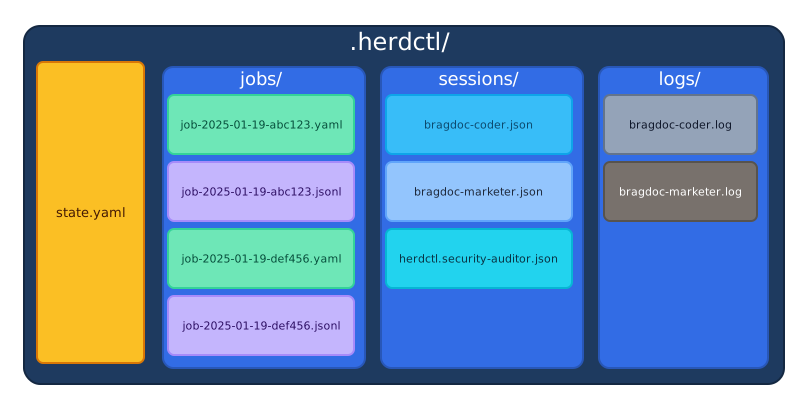
Color key: Navy = root directory, Blue = subdirectories, Amber = fleet state file, Mint = job metadata (.yaml), Lavender = streaming output (.jsonl), Sky/Cyan = session files (.json), Slate/Gray = agent logs (.log).
Naming Conventions
Section titled “Naming Conventions”- Job files use the pattern
job-YYYY-MM-DD-<random6>with both a.yaml(metadata) and.jsonl(streaming output) per job. - Session files use the agent’s qualified name:
<agent-name>.jsonfor simple fleets, or<fleet>.<agent>.jsonfor composed fleets. - Log files use
<agent-name>.log.
Subdirectory Purposes
Section titled “Subdirectory Purposes”| Directory | Purpose |
|---|---|
state.yaml | Fleet-wide state including agent status and scheduling |
jobs/ | Individual job metadata (YAML) and streaming output (JSONL) |
sessions/ | Claude session information for resume/fork capability |
logs/ | Agent-level logs for debugging |
Initialization
Section titled “Initialization”The initStateDirectory() function creates the full directory structure if it does not exist. It accepts an optional custom path (defaulting to .herdctl/ in the current working directory) and performs the following steps:
- Creates the root
.herdctl/directory and all subdirectories (jobs/,sessions/,logs/) usingmkdirwithrecursive: true. - Creates
state.yamlwith an empty fleet state if the file does not exist. - If
state.yamlalready exists, validates it againstFleetStateSchemaand throws aStateFileErrorif the file is corrupted or has an invalid schema. - Runs a final validation pass to confirm all directories and files are in place.
The function returns a StateDirectory object containing resolved paths to every component:
interface StateDirectory { root: string; // .herdctl/ stateFile: string; // .herdctl/state.yaml jobs: string; // .herdctl/jobs/ sessions: string; // .herdctl/sessions/ logs: string; // .herdctl/logs/}Initialization errors produce descriptive messages. For example, a permission error yields a message like "Permission denied: Cannot access '/path/.herdctl'. Check file permissions." rather than a raw EACCES code.
state.yaml Format
Section titled “state.yaml Format”The state.yaml file tracks fleet-wide state. It is validated against FleetStateSchema, a Zod schema defined in packages/core/src/state/schemas/fleet-state.ts.
fleet:  started_at: "2025-01-19T10:00:00Z"   # ISO timestamp when fleet started
agents:  bragdoc-coder:    status: idle              # idle | running | error    current_job: null         # Job ID if currently running    last_job: job-2024-01-19-abc123    next_schedule: issue-check    next_trigger_at: "2025-01-19T10:10:00Z"    container_id: null        # Docker container ID (if using Docker)    error_message: null       # Error message if status is 'error'
  bragdoc-marketer:    status: running    current_job: job-2024-01-19-def456    last_job: job-2024-01-19-xyz789    next_schedule: null    next_trigger_at: null    container_id: "def456"
Zod Schema
Section titled “Zod Schema”The schema enforces types at runtime and applies defaults for missing fields:
const FleetStateSchema = z.object({ fleet: z.object({ started_at: z.string().optional(), }).optional().default({}), agents: z.record(z.string(), AgentStateSchema).optional().default({}),});When state.yaml is missing or empty, the schema defaults produce a valid empty state ({ fleet: {}, agents: {} }).
Agent State Fields
Section titled “Agent State Fields”| Field | Type | Description |
|---|---|---|
status | idle | running | error | Current agent status |
current_job | string? | ID of currently running job |
last_job | string? | ID of the last completed job |
next_schedule | string? | Name of the next scheduled trigger |
next_trigger_at | string? | ISO timestamp of next scheduled run |
container_id | string? | Docker container ID (if containerized) |
error_message | string? | Error message when status is error |
schedules | Record<string, ScheduleState>? | Per-schedule state map |
Agent State Lifecycle
Section titled “Agent State Lifecycle”An agent transitions between three states:
idle: The agent has no running job.current_jobisnull. The scheduler may have populatednext_scheduleandnext_trigger_atto indicate when the next job will start.running: The agent is executing a job.current_jobcontains the active job ID. The Runner set this state when execution began.error: The agent encountered a failure.error_messagedescribes the problem. The agent remains in this state until the next successful job execution or manual reset.
State transitions are performed through updateAgentState(), which reads the current file, applies partial updates to a single agent, and writes back atomically. This ensures other agents’ state is preserved.
Job File Formats
Section titled “Job File Formats”Each job creates two files in .herdctl/jobs/. For details on job lifecycle and management, see Job System.
Job Metadata (YAML)
Section titled “Job Metadata (YAML)”id: job-2024-01-19-abc123agent: bragdoc-marketerschedule: daily-analyticstrigger_type: schedule # manual | schedule | webhook | chat | discord | slack | web | fork
status: completed # pending | running | completed | failed | cancelledexit_reason: success # success | error | timeout | cancelled | max_turns
session_id: claude-session-xyz789forked_from: null # Parent job ID if this was forked
started_at: "2024-01-19T09:00:00Z"finished_at: "2024-01-19T09:05:23Z"duration_seconds: 323
prompt: | Analyze site traffic for the past 24 hours. Create a brief report and post to #marketing channel.
summary: "Generated daily analytics report. Traffic up 12% from yesterday."output_file: job-2024-01-19-abc123.jsonlJob Metadata Fields
Section titled “Job Metadata Fields”| Field | Type | Description |
|---|---|---|
id | string | Format: job-YYYY-MM-DD-<random6> (regex-validated) |
agent | string | Name of the executing agent |
schedule | string? | Schedule name that triggered the job |
trigger_type | enum | How the job was started |
status | enum | Current job status |
exit_reason | enum | Why the job ended (when finished) |
session_id | string? | Claude session ID for resume/fork |
forked_from | string? | Parent job ID (for forked jobs) |
started_at | string | ISO timestamp when job started |
finished_at | string? | ISO timestamp when job finished |
duration_seconds | number? | Total execution time |
prompt | string? | The prompt given to the agent |
summary | string? | Brief summary of job results |
output_file | string? | Path to the JSONL output file |
Job ID Generation
Section titled “Job ID Generation”Job IDs follow the format job-YYYY-MM-DD-<random6>, where the random suffix is 6 lowercase alphanumeric characters generated from Math.random().toString(36). The generateJobId() function accepts an optional Date and random function for deterministic testing:
function generateJobId( date: Date = new Date(), randomFn: () => string = () => Math.random().toString(36).slice(2, 8),): string { const year = date.getFullYear(); const month = String(date.getMonth() + 1).padStart(2, "0"); const day = String(date.getDate()).padStart(2, "0"); const random = randomFn().slice(0, 6).padEnd(6, "0"); return `job-${year}-${month}-${day}-${random}`;}The JobMetadataSchema validates this format with a regex: /^job-\d{4}-\d{2}-\d{2}-[a-z0-9]{6}$/.
Job Status Values
Section titled “Job Status Values”| Status | Description |
|---|---|
pending | Job created but not yet started |
running | Job is currently executing |
completed | Job finished successfully |
failed | Job ended with an error |
cancelled | Job was cancelled by user |
Exit Reason Values
Section titled “Exit Reason Values”| Exit Reason | Description |
|---|---|
success | Job completed naturally |
error | Job failed due to an error |
timeout | Job exceeded configured time limit |
cancelled | Job was cancelled by user intervention |
max_turns | Job reached maximum conversation turns |
Trigger Types
Section titled “Trigger Types”| Trigger Type | Description |
|---|---|
manual | Started via CLI or API call |
schedule | Triggered by the scheduler |
webhook | Triggered by an external webhook |
chat | Triggered by a generic chat message |
discord | Triggered by a Discord message |
slack | Triggered by a Slack message |
web | Triggered from the web dashboard |
fork | Forked from a previous job’s session |
Streaming Output (JSONL)
Section titled “Streaming Output (JSONL)”Job output is stored as newline-delimited JSON (JSONL) for efficient streaming. The Runner writes to this file in real time as the agent executes:
{"type":"system","subtype":"init","timestamp":"2024-01-19T09:00:00Z"}{"type":"assistant","content":"I'll analyze the traffic data...","timestamp":"2024-01-19T09:00:01Z"}{"type":"tool_use","tool_name":"Bash","input":"node scripts/get-analytics.js","timestamp":"2024-01-19T09:00:02Z"}{"type":"tool_result","result":"...analytics output...","success":true,"timestamp":"2024-01-19T09:00:05Z"}{"type":"assistant","content":"Traffic is up 12% from yesterday...","timestamp":"2024-01-19T09:00:10Z"}JSONL properties:
- Streamable: Each line is self-contained, so the file can be read while still being written to.
- Append-only: New messages are appended, never inserted or overwritten.
- Replayable: The full conversation can be reconstructed by reading the file from top to bottom.
- No buffering: Messages are written immediately via
fs.appendFileso external monitors see output in real time.
JSONL Message Types
Section titled “JSONL Message Types”All messages include a type field and timestamp. The schema uses a Zod discriminated union on the type field, defined in packages/core/src/state/schemas/job-output.ts. The five message types are:
system
Section titled “system”System events like session initialization:
{ "type": "system", "subtype": "init", "content": "Session initialized", "timestamp": "2024-01-19T09:00:00Z"}Fields: content (optional string), subtype (optional string, e.g., "init").
assistant
Section titled “assistant”Claude’s text responses:
{ "type": "assistant", "content": "I'll analyze the traffic data...", "partial": false, "usage": { "input_tokens": 1500, "output_tokens": 200 }, "timestamp": "2024-01-19T09:00:01Z"}Fields: content (optional string), partial (optional boolean indicating streaming chunk), usage (optional object with input_tokens and output_tokens).
tool_use
Section titled “tool_use”Tool invocations by Claude:
{ "type": "tool_use", "tool_name": "Bash", "tool_use_id": "toolu_abc123", "input": "gh issue list --label ready --json number,title", "timestamp": "2024-01-19T09:00:02Z"}Fields: tool_name (string), tool_use_id (optional string), input (optional, any type).
tool_result
Section titled “tool_result”Results from tool execution:
{ "type": "tool_result", "tool_use_id": "toolu_abc123", "result": "[{\"number\":42,\"title\":\"Fix auth timeout\"}]", "success": true, "error": null, "timestamp": "2024-01-19T09:00:05Z"}Fields: tool_use_id (optional string), result (optional, any type), success (optional boolean), error (optional string).
Error messages:
{ "type": "error", "message": "Tool execution failed", "code": "TOOL_ERROR", "stack": "...", "timestamp": "2024-01-19T09:00:05Z"}Fields: message (required string), code (optional string), stack (optional string).
Input Types
Section titled “Input Types”When appending messages via the API, timestamps are added automatically. The JobOutputInput type accepts any of the five message types without the timestamp field. The isValidJobOutputInput() function provides a type guard that checks for the presence of a valid type field.
Session Info Format
Section titled “Session Info Format”Session files track Claude session state for resume/fork capability. They are stored as JSON in .herdctl/sessions/ and validated against SessionInfoSchema.
{ "agent_name": "bragdoc-coder", "session_id": "claude-session-xyz789", "created_at": "2024-01-19T08:00:00Z", "last_used_at": "2024-01-19T10:05:00Z", "job_count": 15, "mode": "autonomous", "working_directory": "/home/user/project", "runtime_type": "sdk", "docker_enabled": false}Session Info Fields
Section titled “Session Info Fields”| Field | Type | Description |
|---|---|---|
agent_name | string | Agent this session belongs to (qualified name for composed fleets) |
session_id | string | Claude session ID for resuming conversations |
created_at | string (ISO) | When the session was created |
last_used_at | string (ISO) | When the session was last used |
job_count | number | Number of jobs executed in this session |
mode | enum | Operational mode of the session |
working_directory | string? | Working directory when the session was created |
runtime_type | "sdk" | "cli" | Runtime type used when the session was created |
docker_enabled | boolean | Whether Docker was enabled when the session was created |
The working_directory and runtime_type fields are used for session invalidation. If the working directory changes or the runtime type switches between SDK and CLI, the existing session may no longer be valid and a fresh session is started.
Session Modes
Section titled “Session Modes”| Mode | Description |
|---|---|
autonomous | Agent runs independently |
interactive | Human-in-the-loop mode |
review | Review/approval required for actions |
For more on sessions, see Sessions.
Schedule State
Section titled “Schedule State”Each agent can have multiple schedules, each with its own state tracked within the agent’s entry in state.yaml. The Scheduler manages these state transitions during the polling loop.
agents: my-agent: status: idle schedules: check-issues: status: idle # idle | running | disabled last_run_at: "2025-01-19T10:05:00Z" next_run_at: "2025-01-19T10:10:00Z" last_error: null daily-report: status: running last_run_at: "2025-01-19T09:00:00Z" next_run_at: null last_error: nullSchedule State Fields
Section titled “Schedule State Fields”| Field | Type | Description |
|---|---|---|
status | idle | running | disabled | Current schedule status |
last_run_at | string? (ISO) | When the schedule last completed |
next_run_at | string? (ISO) | Calculated next trigger time |
last_error | string? | Error message from last failure |
The createDefaultScheduleState() factory function initializes a new schedule with idle status and all nullable fields set to null.
For more details on schedule state, see Scheduler Architecture.
Atomic Write Pattern
Section titled “Atomic Write Pattern”All state file writes (YAML and JSON) use atomic writes to prevent corruption. This is implemented in packages/core/src/state/utils/atomic.ts.
How It Works
Section titled “How It Works”-
Write to temp file: Content is written to
.<filename>.tmp.<random>in the same directory as the target. The random suffix is 16 hex characters fromcrypto.randomBytes(8). Writing to the same directory ensures the temp file is on the same filesystem, which is required for atomic rename. -
Atomic rename: The temp file is renamed to the target path using
fs.rename. On POSIX systems (Linux, macOS), rename is an atomic operation — the file either appears with the complete content or does not appear at all. -
Cleanup on failure: If either the write or rename fails, the temp file is removed (best-effort, ignoring
ENOENT). The original file remains untouched.
// Simplified implementationasync function atomicWriteFile(filePath: string, content: string): Promise<void> { const tempPath = join(dirname(filePath), `.${basename(filePath)}.tmp.${randomHex}`); try { await writeFile(tempPath, content, "utf-8"); await renameWithRetry(tempPath, filePath); } catch (error) { await cleanupTempFile(tempPath); throw new AtomicWriteError(/* ... */); }}This pattern ensures:
- No partial writes: Files are never in an incomplete state visible to readers.
- Crash safety: If the process crashes mid-write, the original file remains intact.
- Concurrent safety: Multiple readers will never see incomplete data.
Convenience Wrappers
Section titled “Convenience Wrappers”Two higher-level functions build on atomicWriteFile:
atomicWriteYaml(filePath, data)— Serializes data to YAML (via theyamllibrary with 2-space indent) and writes atomically.atomicWriteJson(filePath, data)— Serializes data to JSON (with 2-space indent) and writes atomically.
JSONL Append Semantics
Section titled “JSONL Append Semantics”JSONL files use a different strategy from YAML/JSON files. Instead of atomic write-and-replace, they use fs.appendFile, which appends a single line at a time:
async function appendJsonl(filePath: string, data: unknown): Promise<void> { const line = JSON.stringify(data) + "\n"; await appendFile(filePath, line, "utf-8");}Key properties of this approach:
- Message-level atomicity: On most systems,
appendFilewrites are atomic for reasonably sized lines (under the filesystem’s write buffer size, typically 4KB+). Each JSONL line is a complete JSON object. - No buffering: Each message is written immediately, so external tools (CLI, web dashboard) can monitor output in real time.
- Append-only: The file is never rewritten or truncated during normal operation.
- Failure isolation: If an append fails, all previously written lines remain intact.
Windows Compatibility
Section titled “Windows Compatibility”On Windows, fs.rename can fail with EACCES or EPERM if another process has the target file open (common with antivirus scanners and indexing services). The renameWithRetry function handles this with exponential backoff:
async function renameWithRetry(oldPath, newPath, options = {}): Promise<void> { const { maxRetries = 3, baseDelayMs = 50 } = options; for (let attempt = 0; attempt <= maxRetries; attempt++) { try { await rename(oldPath, newPath); return; } catch (error) { if (error.code !== "EACCES" && error.code !== "EPERM") throw error; if (attempt < maxRetries) { await sleep(baseDelayMs * 2 ** attempt); // 50ms, 100ms, 200ms } } } throw lastError;}Only EACCES and EPERM errors trigger retries. All other errors (e.g., ENOENT, ENOSPC) propagate immediately.
Safe Read Operations
Section titled “Safe Read Operations”Read operations are designed for concurrent access without locks. The utilities in packages/core/src/state/utils/reads.ts handle the edge cases that arise when reading files that may be in the middle of an atomic write.
safeReadYaml
Section titled “safeReadYaml”Reads and parses a YAML file with retry logic:
- Transient error detection: YAML parse errors and JSON syntax errors (
"unexpected end","unexpected token") are treated as potentially transient, since they can occur when reading during an atomic write before the rename completes. - Exponential backoff: Up to 3 retries with delays of 10ms, 20ms, 40ms (configurable).
- Non-retryable errors:
ENOENT(file not found),EACCES, andEPERMare returned immediately as failures. - Empty files: An empty YAML file returns
nullper the YAML specification. - Result type: Returns
{ success: true, data }or{ success: false, error }for explicit error handling.
safeReadJsonl
Section titled “safeReadJsonl”Reads and parses a JSONL file, handling incomplete content:
- Incomplete last line: The last line (or second-to-last if the file ends with a newline) is silently skipped if it fails to parse. This handles the case where a read occurs while an
appendFileis in progress. - Middle-line errors: Invalid lines in the middle of the file either throw (default) or skip (
skipInvalidLines: trueoption). - Empty files: Returns an empty array.
- Tracking: Returns a
skippedLinescount alongside the parsed data.
safeReadJson
Section titled “safeReadJson”Reads and parses a JSON file with the same retry logic as safeReadYaml, handling transient errors from concurrent atomic writes.
Error Handling
Section titled “Error Handling”The state module uses a typed error hierarchy for precise error discrimination:
| Error Class | When Thrown |
|---|---|
StateError | Base class for all state errors |
StateDirectoryCreateError | Directory creation fails (includes system code like EACCES) |
StateDirectoryValidationError | Directory structure is invalid (includes list of missingPaths) |
StateFileError | State file read/write fails (includes path and operation) |
AtomicWriteError | Atomic write fails (includes path and tempPath) |
SafeReadError | Safe read fails after retries (includes path and system code) |
All errors include the original cause via the standard Error.cause property, enabling full stack trace inspection. The getPermissionErrorMessage() utility translates system error codes into human-readable messages (e.g., EACCES becomes "Permission denied: Cannot access '/path'. Check file permissions.").
Debugging State Issues
Section titled “Debugging State Issues”Inspect Current State
Section titled “Inspect Current State”# View fleet statecat .herdctl/state.yaml
# View specific jobcat .herdctl/jobs/job-2024-01-19-abc123.yaml
# View job output (streaming log)cat .herdctl/jobs/job-2024-01-19-abc123.jsonl
# View session infocat .herdctl/sessions/bragdoc-coder.json
# Count lines in a job outputwc -l .herdctl/jobs/job-2024-01-19-abc123.jsonl
# Search for errors in job outputgrep '"type":"error"' .herdctl/jobs/job-2024-01-19-abc123.jsonlCommon Issues
Section titled “Common Issues”| Symptom | Likely Cause | Solution |
|---|---|---|
Agent stuck in running | Process crash during job execution | Edit state.yaml and set the agent’s status to idle and current_job to null |
| Missing job output | Write failure during execution | Check disk space (df -h) and directory permissions (ls -la .herdctl/jobs/) |
| Session won’t resume | Invalid or stale session ID | Delete the agent’s session file from .herdctl/sessions/ |
| Session invalidated unexpectedly | Working directory or runtime type changed | Check working_directory and runtime_type in the session file against current config |
Stale temp files (.*.tmp.*) | Previous process crashed mid-write | Safe to delete manually; atomic writes ensure the original file was not corrupted |
StateDirectoryValidationError | Subdirectory accidentally deleted | Re-run the fleet to trigger initStateDirectory(), or manually mkdir the missing directory |
StateFileError on startup | Corrupted state.yaml (e.g., from manual edit) | Fix the YAML syntax, or delete state.yaml and restart (a fresh empty state will be created) |
Verifying State Consistency
Section titled “Verifying State Consistency”To check that the on-disk state matches expectations:
# List all jobs with their statusfor f in .herdctl/jobs/*.yaml; do  echo "$(basename "$f"): $(grep 'status:' "$f" | head -1)"done
# Find agents still marked as runninggrep -A1 'status: running' .herdctl/state.yaml
# Check for orphaned temp files (should not exist during normal operation)ls -la .herdctl/.*.tmp.* 2>/dev/nullls -la .herdctl/jobs/.*.tmp.* 2>/dev/null
Source Code Layout
Section titled “Source Code Layout”The state module lives in packages/core/src/state/ with the following structure:
packages/core/src/state/├── index.ts # Public exports├── schemas/│ ├── index.ts # Schema exports│ ├── fleet-state.ts # FleetStateSchema, AgentStateSchema, ScheduleStateSchema│ ├── job-metadata.ts # JobMetadataSchema, TriggerTypeSchema, ExitReasonSchema│ ├── job-output.ts # JobOutputMessageSchema (discriminated union)│ └── session-info.ts # SessionInfoSchema, SessionModeSchema├── directory.ts # initStateDirectory(), getStateDirectory(), validateStateDirectory()├── fleet-state.ts # readFleetState(), writeFleetState(), updateAgentState()├── job-metadata.ts # createJob(), updateJob(), getJob(), listJobs()├── job-output.ts # appendJobOutput(), readJobOutput()├── session.ts # getSessionInfo(), updateSessionInfo(), clearSession()├── session-validation.ts # Working directory and runtime type validation├── errors.ts # StateError, StateDirectoryCreateError, etc.├── types.ts # TypeScript types and constants├── working-directory-validation.ts└── utils/ ├── index.ts # Utility exports ├── atomic.ts # atomicWriteFile(), atomicWriteYaml(), atomicWriteJson(), appendJsonl() ├── reads.ts # safeReadYaml(), safeReadJsonl(), safeReadJson() └── path-safety.ts # Path traversal preventionRelated Pages
Section titled “Related Pages”Architecture
Section titled “Architecture”- System Architecture Overview — StateManager’s role in the system
- Agent Execution Engine — How the Runner writes job output
- Schedule System — How schedule state is managed
- Job System — Job metadata and lifecycle