
Agents
An Agent is a configured Claude Code instance with its own identity, workspace, permissions, and schedules. Think of it as a specialized team member that operates autonomously on your codebase.
What is an Agent?
Section titled “What is an Agent?”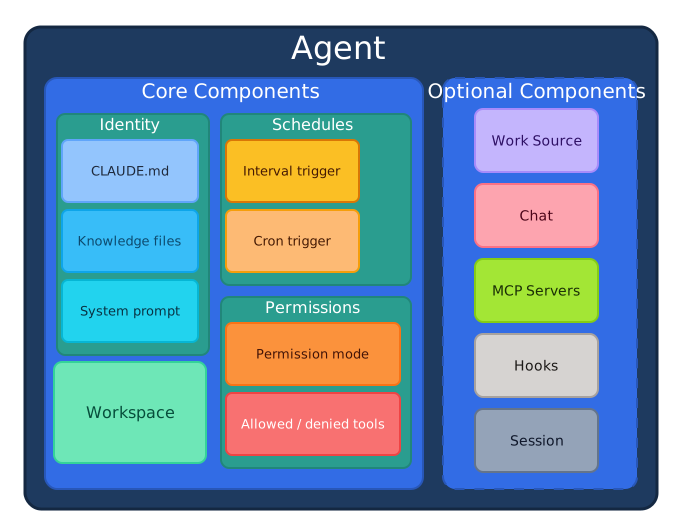
Each agent operates independently with:
- Identity: CLAUDE.md instructions, knowledge files, personality
- Workspace: The working directory (repo clone) the agent operates in
- Permissions: Exactly which tools the agent can use
- Schedules: When and how to invoke (multiple allowed per agent)
Standalone vs. Project-Embedded Agents
Section titled “Standalone vs. Project-Embedded Agents”Every herdctl agent has a workspace directory. This creates two natural categories depending on how that workspace is used.
Standalone agents have their own dedicated workspace for storing data. A price checker keeps price history in its folder. A hurricane tracker stores weather data. These agents do not need an existing codebase — they create their own working environment from scratch and use their workspace primarily for data persistence.
Project-embedded agents run inside an existing Claude Code project — one that already has a CLAUDE.md, local skills, sub-agents, and project-specific configuration. When you point a herdctl agent at an existing project directory, it operates exactly as if you ran claude in that directory. Your instructions are honored, your slash commands work, and your MCP servers are available. This means you can add autonomous capabilities (scheduled jobs, chat interfaces, webhook triggers) to any existing Claude Code project without changing how that project is set up.
Key Properties
Section titled “Key Properties”| Property | Required | Description |
|---|---|---|
name | Yes | Unique identifier for the agent within your fleet |
description | No | Human-readable explanation of the agent’s purpose |
workspace | Yes | Directory name for the agent’s working copy |
repo | Yes | Git repository to clone (e.g., owner/repo) |
identity | No | Agent-specific CLAUDE.md and knowledge files |
schedules | Yes | One or more triggers defining when the agent runs |
work_source | No | Where the agent gets tasks from (e.g., GitHub Issues) |
permissions | No | Tool access and file restrictions |
session | No | Session persistence and timeout settings |
Example Agent Configuration
Section titled “Example Agent Configuration”Here’s a complete example of an agent that implements features and fixes bugs:
name: bragdoc-coderdescription: "Implements features and fixes bugs in Bragdoc"
# Workspace (the repo this agent works in)workspace: bragdoc-airepo: edspencer/bragdoc-ai
# Agent identityidentity:  claude_md: inherit  # Use repo's CLAUDE.md  knowledge_dir: .claude/knowledge/  journal: journal.md  # Persistent memory
# Work source configurationwork_source:  type: github  filter:    labels:      any: ["ready", "bug", "feature"]    exclude_labels: ["blocked", "needs-design"]  claim:    add_label: "in-progress"    remove_label: "ready"  complete:    remove_label: "in-progress"    close_issue: true    comment: "Completed: {{summary}}"
# Schedule for checking issuesschedules:  - name: issue-check    trigger:      type: interval      every: 5m    prompt: |      Check for ready issues in the repository.      Pick the oldest one and implement it.      Update journal.md with your progress.
# Session managementsession:  mode: fresh_per_job  # New session per job
Agent Identity
Section titled “Agent Identity”Every agent has a unique identity defined by:
A unique identifier for the agent within your fleet. Use descriptive names that indicate the agent’s purpose:
bragdoc-coder- Implements featuresbragdoc-marketer- Handles marketing tasksproject-support- Answers user questions
Description
Section titled “Description”A human-readable description of what the agent does. This appears in the dashboard and helps team members understand each agent’s role.
CLAUDE.md
Section titled “CLAUDE.md”Agent-specific instructions that define behavior, conventions, and context. You can:
- Inherit the repo’s existing CLAUDE.md
- Specify a custom file (e.g.,
.claude/marketer-CLAUDE.md) - Extend with additional knowledge files
identity: claude_md: .claude/marketer-CLAUDE.md # Custom identity knowledge_dir: .claude/knowledge/ # Additional contextMultiple Agents, Same Workspace
Section titled “Multiple Agents, Same Workspace”Multiple agents can share the same workspace (repo clone). For example:
bragdoc-coder- Implements features in bragdoc-aibragdoc-marketer- Handles marketing in bragdoc-aibragdoc-support- Answers questions about bragdoc-ai
Each has different schedules, prompts, and potentially different identity files, but they all work on the same codebase.
Agent Lifecycle
Section titled “Agent Lifecycle”- Created: Agent configuration loaded from YAML
- Initialized: Workspace cloned and prepared
- Idle: Waiting for next trigger
- Running: Executing a scheduled task (creates a Job)
- Completed: Task finished, returns to idle
- Stopped: Agent manually stopped
Common Patterns
Section titled “Common Patterns”The Coder Agent
Section titled “The Coder Agent”Implements features and fixes bugs from issue trackers:
name: project-coderdescription: "Implements features from GitHub Issues"workspace: my-projectrepo: owner/my-project
work_source:  type: github  filter:    labels:      any: ["ready"]
schedules:  - name: issue-check    trigger:      type: interval      every: 5m    prompt: "Check for ready issues and implement the oldest one."
The Marketing Agent
Section titled “The Marketing Agent”Monitors channels and generates reports:
name: project-marketerdescription: "Monitors social media and generates analytics"workspace: my-projectrepo: owner/my-project
schedules:  - name: hourly-scan    trigger:      type: cron      cron: "0 * * * *"    prompt: "Scan social media for product mentions."
  - name: daily-report    trigger:      type: cron      cron: "0 9 * * *"    prompt: "Generate daily analytics report."
The Support Agent
Section titled “The Support Agent”Responds to chat messages. Chat-enabled agents appear as distinct “colleagues” in your messaging platform.
Discord — each agent has its own Discord bot:
name: project-supportdescription: "Answers user questions in Discord"workspace: my-projectrepo: owner/my-project
chat:  discord:    bot_token_env: SUPPORT_DISCORD_TOKEN  # This agent's own bot    guilds:      - id: "guild-id-here"        channels:          - id: "123456789"            mode: mention  # Responds when @mentioned        dm:          enabled: true          mode: auto
session:  mode: per_channel  # Separate context per channel
Slack — agents share one bot, with different channels routing to different agents:
name: project-supportdescription: "Answers user questions in Slack"workspace: my-projectrepo: owner/my-project
chat:  slack:    bot_token_env: SLACK_BOT_TOKEN    app_token_env: SLACK_APP_TOKEN    channels:      - id: "C0123456789"        mode: mention  # Responds when @mentioned
session:  mode: per_channel  # Separate context per channel
Related Concepts
Section titled “Related Concepts”- Schedules - Define when agents run
- Triggers - What starts agent execution
- Workspaces - Where agents operate
- Jobs - Individual agent executions
- Sessions - Agent context management
Configuration Reference
Section titled “Configuration Reference”For the complete schema and all available options, see:
- Agent Configuration - Full YAML reference
- Permissions - Tool and file access control
- Fleet Configuration - Fleet-wide defaults